


Xodo Sign (Formerly eversign) vs DocuSign (2026): Costs and a Third Option
Compare Xodo Sign, formerly eversign, with DocuSign on pricing, sending limits, QES, storage and HIPAA, then see how Sign.Plus gives US freelancers and small businesses a third option in 2026.


- eversign is now Xodo Sign. Its paid plans include unlimited documents, while DocuSign Standard and Business Pro include 100 envelopes per user per year.
- No QES offering was found on Xodo Sign's reviewed public pages. DocuSign lists QES on Enhanced in the US, while Sign.Plus offers QES on every plan.
- Xodo Sign does not publish a storage region choice for customers. DocuSign residency is on Enhanced and fixed at account creation. Sign.Plus uses Swiss storage by default and offers 43 locations on Enterprise.
- Xodo Sign HIPAA support requires a signed BAA through sales, and DocuSign lists HIPAA on Enhanced. Sign.Plus Enterprise includes HIPAA with Advanced Security Controls and a signed BAA at a published price.
- Sign.Plus is the third option, with unlimited signature requests on paid plans, published per-user pricing and no user minimum on Professional.
eversign is now Xodo Sign. If you are researching eversign vs DocuSign, the product name has changed, but the buying decision remains important for US freelancers and small businesses looking for a cheaper DocuSign alternative. We tested Xodo Sign and DocuSign hands-on by sending a real test agreement through each, and we keep retesting both as their features and plans change.
This Xodo Sign vs DocuSign comparison covers pricing, sending limits, QES, storage, HIPAA and the signing experience. The older DocuSign vs eversign search now leads to the same comparison. Sign.Plus is included as a third option from Alohi, a Swiss provider based in Geneva.
Xodo Sign vs DocuSign at a Glance
| Feature | Xodo Sign | DocuSign | Sign.Plus |
|---|---|---|---|
| Pricing model | Per user, Free plan and paid plans | Per-user eSignature plans, plus quote-based Enhanced | Published per-user plans |
| Sending limit | Free: up to 5 documents a month, limited to 1 every 7 days. Paid: unlimited documents | Personal: 5 envelopes a month. Standard and Business Pro: 100 envelopes per user per year | Unlimited signature requests on paid plans |
| Signer verification | SMS or PIN authentication, one method at a time in our test | SMS delivery and ID checks available as paid add-ons | Per-recipient passcode, SMS code and ID Check |
| QES | No QES offering found on reviewed public pages | Enhanced on the US price list; paid add-on on reviewed European price lists | Available on every plan, including Free |
| Storage region | No customer-selectable region published | US, Canada, Europe, Australia or Japan on Enhanced; fixed at account creation | Switzerland by default; 43 storage locations on Enterprise, with later moves allowed |
| HIPAA | Signed BAA through sales; plan and price not published | BAA available; HIPAA listed on Enhanced | Enterprise includes HIPAA with Advanced Security Controls and a signed BAA |
| Company | eversign GmbH, doing business as Xodo Sign, part of Apryse | US company based in San Francisco | Swiss product by Alohi in Geneva |
Xodo Sign or DocuSign: Which Should You Choose?
- Choose Xodo Sign if you want a free plan or paid per-user plans with unlimited documents, and your process does not require a published QES offering or customer-selectable storage region.
- Choose DocuSign if its brand, plan families and more than 1,000 prebuilt integrations matter to you, and its envelope allowances fit your sending volume. In the US, QES, data residency and HIPAA require a sales conversation about Enhanced.
- Consider Sign.Plus if you want unlimited signature requests, QES on every plan and published routes to storage choice and HIPAA. Its paid plans use per-user pricing, while QES is charged per recipient.
What Are Xodo Sign and DocuSign?
Xodo Sign (Formerly eversign)
Xodo Sign is the new name for eversign. The product is sold by eversign GmbH, doing business as Xodo Sign, and is part of Apryse. The website still uses eversign.com.
It offers a Free plan and per-user paid plans with unlimited documents.
DocuSign
DocuSign is a US company based in San Francisco. Its product families include eSignature, IAM, Real Estate and Developer. The eSignature family includes Personal, Standard, Business Pro and Enhanced.
DocuSign advertises more than 1,000 prebuilt integrations. Its eSignature plans use envelope allowances, while several advanced compliance options are packaged with Enhanced in the US.
What Is the Main Difference?
Xodo Sign's paid plans remove document-count limits. DocuSign counts envelopes, including sends that are never signed. That makes expected sending volume central to the cost comparison.
The other difference is packaging. Xodo Sign's reviewed pages did not publish a QES offering or storage-region choice, while DocuSign places QES, residency and HIPAA on Enhanced in the US. Sign.Plus provides a third model: unlimited requests on paid plans and QES across every plan.
How We Compared Xodo Sign and DocuSign
We read the vendors' public pricing, compliance, help, terms, privacy and API pages, then sent a test agreement through each in November 2026. Statements about features not being published refer only to the pages we reviewed.
Hands-on observations reflect our test accounts and their default settings. Sign.Plus is our product, so its inclusion below is based on separately stated plan and compliance facts.
1. Xodo Sign vs DocuSign Pricing
Xodo Sign Pricing
| Plan | Price | Document Allowance | Main Inclusions |
|---|---|---|---|
| Free | Free | Up to 5 documents a month, limited to 1 document every 7 days | Low-volume document signing |
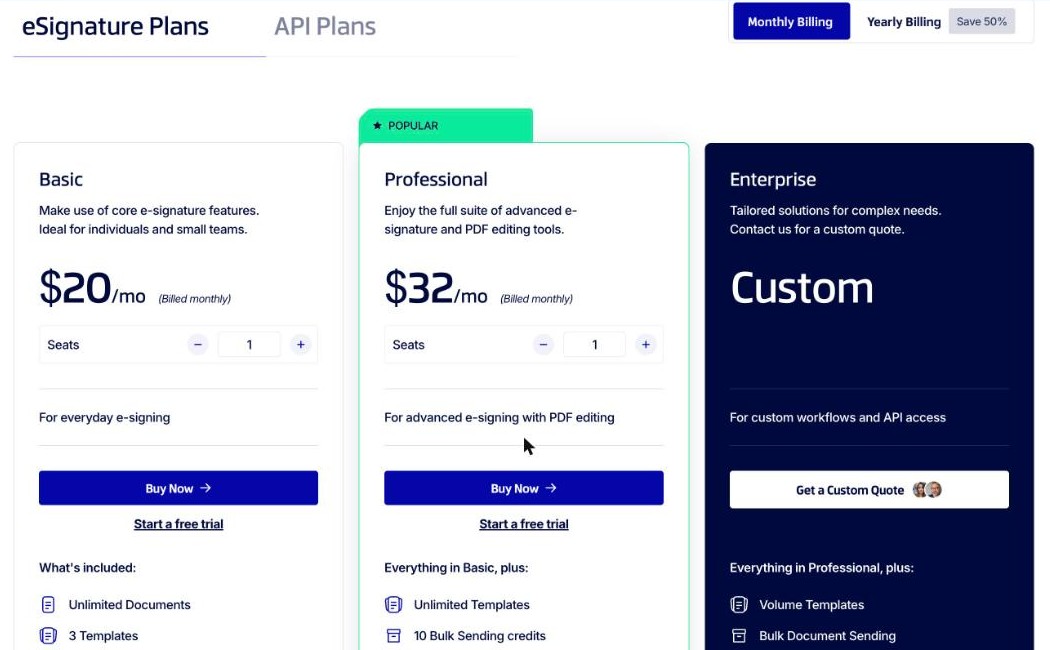
| Basic | $10 per user per month on yearly billing; $20 monthly | Unlimited documents | 3 templates, mobile apps, Zapier, Dropbox and Gmail integrations, email support |
| Professional | $16 per user per month on yearly billing; $32 monthly | Unlimited documents | Unlimited templates, 10 bulk-sending credits and 10 SMS credits per seat, advanced PDF editing, AI summarizer, custom branding and in-person signing |
| Enterprise | Custom quote | Not published | Custom quote |
Xodo Sign's help center says every paid plan includes at least 10 SMS-authenticated signers a month. Additional SMS-authenticated signers cost $0.25 each. PIN signer authentication is also available.
A 7-day free trial of Professional is available without a credit card. Signers do not need paid seats.
DocuSign Pricing
| Plan | Annual Upfront | Annual, Billed Monthly | Monthly | Sending Allowance |
|---|---|---|---|---|
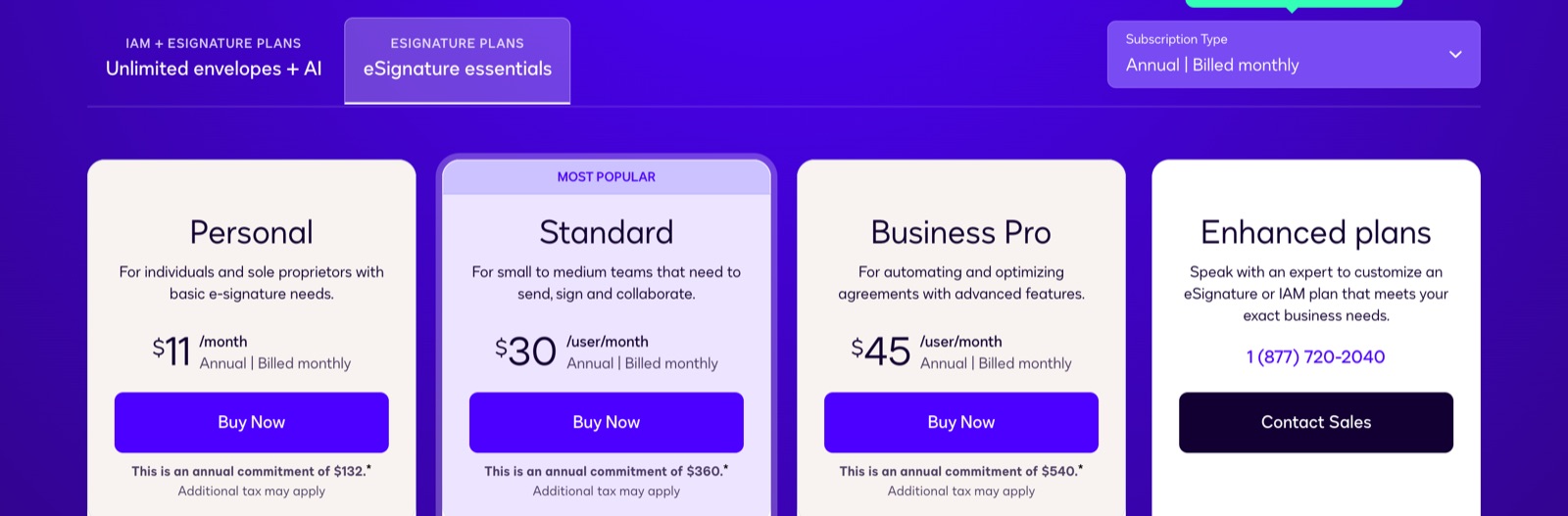
| Personal | $10 | $11 | $15 | 5 envelopes a month; 1 user |
| Standard | $25 per user | $30 per user | $45 per user | 100 envelopes per user per year |
| Business Pro | $40 per user | $45 per user | $65 per user | 100 envelopes per user per year |
| Enhanced | Contact sales | Contact sales | Contact sales | Contact sales |
These are the reviewed US prices. DocuSign also charges for some verification methods: SMS starts at $0.36 per delivery, and ID checks start at $2.40 per attempt. Envelope overage is billed per envelope.
How Much Does Xodo Sign Cost Compared With DocuSign?
On annual pricing, Xodo Sign Basic and DocuSign Personal both start at $10 per month, but their allowances differ substantially. Basic includes unlimited documents. Personal includes 5 envelopes a month and supports one user.
DocuSign Personal can cost less on month-to-month billing, at $15 versus $20 for Xodo Sign Basic, but its envelope cap remains. Xodo Sign can cost less for frequent sending because its paid plans remove document limits. DocuSign Standard and Business Pro instead provide 100 envelopes per user per year.
List price alone does not establish feature equivalence. Include templates, verification, expected overages and any required compliance options in your budget.
How Xodo Sign and DocuSign Pricing Compare With Sign.Plus
Against Xodo Sign, compare features rather than subscription price alone. Sign.Plus Professional includes 10 templates, while Xodo Sign Basic includes 3 and Xodo Sign Professional includes unlimited templates. Sign.Plus also offers QES on every plan, per-recipient passcode, SMS code and ID Check options, and published ISO/IEC 27001:2022 certification. Sign.Plus Enterprise adds storage choice and HIPAA with Advanced Security Controls and a signed BAA.
Against DocuSign, Sign.Plus Professional costs $19.99 per user per month on annual billing, compared with DocuSign Standard at $25 annual upfront. Sign.Plus Business costs $29.99, compared with DocuSign Business Pro at $40 annual upfront. These are list-price comparisons, not claims that the tiers have identical features.
Both Sign.Plus tiers include unlimited signature requests, while those DocuSign tiers include 100 envelopes per user per year. Sign.Plus Professional has no user minimum. Sign.Plus Enterprise costs $49.99 per user per month annually and adds storage choice, SSO and HIPAA; DocuSign Enhanced requires a sales quote.
2. Usage Limits: Documents vs Envelopes
Xodo Sign Usage Limits
The Free plan allows up to 5 documents a month, but only one document every 7 days. Basic and Professional include unlimited documents. That makes their sending model easier to estimate for users who expect regular volume.
SMS authentication still has an allowance and overage charge. Professional also has specific bulk-sending and SMS credit allowances.
DocuSign Usage Limits
An envelope counts when it is sent, whether or not anyone signs it. Voiding an envelope does not return it to your allowance. Bulk sends and API sends also count.
Personal includes 5 envelopes a month. Standard and Business Pro include 100 envelopes per user per year, with overage billed per envelope. This model can work for predictable volume, but failed or voided sends still consume capacity.
How Their Usage Compares With Sign.Plus
Sign.Plus Professional, Business and Enterprise include unlimited signature requests. Its SMS and WhatsApp requests remain plan-specific: 10 per seat per month on Professional, 30 on Business and 150 on Enterprise. QES and ID Check are separately priced.
3. QES and eIDAS: Xodo Sign vs DocuSign
Which Signature Level Do You Need?
For European signature requirements, the eIDAS regulation defines three levels. The appropriate level depends on the assurance your document process requires.
- SES: Simple Electronic Signature
- AES: Advanced Electronic Signature
- QES: Qualified Electronic Signature
How Xodo Sign Handles QES
No QES offering was found on Xodo Sign's reviewed public pages. We reviewed its pricing, compliance and help materials. Its workflows are described as eIDAS-aligned and ESIGN compliant, but those descriptions should not be treated as a published QES plan.
How DocuSign Handles QES
On the US price list, DocuSign offers QES only on Enhanced, which requires contacting sales. Reviewed European price lists offer QES as a paid add-on for Personal, Standard and Business Pro. QES through the API is also tied to Enhanced.
How Xodo Sign and DocuSign QES Compare With Sign.Plus
Sign.Plus offers QES on every plan, including Free, through Swisscom Trust Services for eIDAS and ZertES. It costs $5 per recipient, including identity verification, and credits never expire. This provides a published per-recipient option rather than reserving QES for a quote-based plan. Read more about eIDAS signatures with Sign.Plus.
4. Where Your Documents Live
Xodo Sign Storage
Xodo Sign does not publish a customer-selectable storage region on the reviewed pages. The Apryse privacy notice allows processing in several countries, and listed subprocessors show US data locations.
If you use the AI summary feature, document content is sent to Google Gemini. Businesses with content-processing restrictions should include that behavior in their review.
DocuSign Storage
DocuSign offers data residency in the US, Canada, Europe, Australia and Japan on Enhanced. The region is selected when the account is created and cannot be moved later.
That provides named regional choices, but it requires the quote-based plan and an early decision about where the account should reside.
How Their Storage Options Compare With Sign.Plus
Sign.Plus stores documents in Switzerland by default under the Swiss FADP, with EU adequacy. Enterprise customers can choose among 43 storage locations. Unlike DocuSign's fixed account region, Sign.Plus allows documents to move later.
5. HIPAA and Security Certifications
Xodo Sign HIPAA and Security
Xodo Sign markets HIPAA support with a signed BAA through sales. The required plan and price are not published. Its help center also states that using Xodo Sign alone does not constitute HIPAA compliance.
SOC 2 Type 2 is described as being provided through infrastructure partners. ISO 27001 was not published on the reviewed product pages.
DocuSign HIPAA and Security
DocuSign publishes SOC 2 Type 2 and ISO 27001. A BAA is available, and HIPAA is listed on Enhanced. US buyers therefore need a sales quote to establish the plan and cost for that requirement.
How Their Compliance Compares With Sign.Plus
Sign.Plus publishes ISO/IEC 27001:2022 certification from EY CertifyPoint, a SOC 2 Type 2 report from EY and CSA STAR listing.
HIPAA is available on Enterprise with Advanced Security Controls and a signed BAA. Enterprise has a published price of $49.99 per user per month on annual billing, rather than requiring a quote solely to identify the plan price.
6. Signing Experience: What We Saw Hands-On
Sending With Xodo Sign
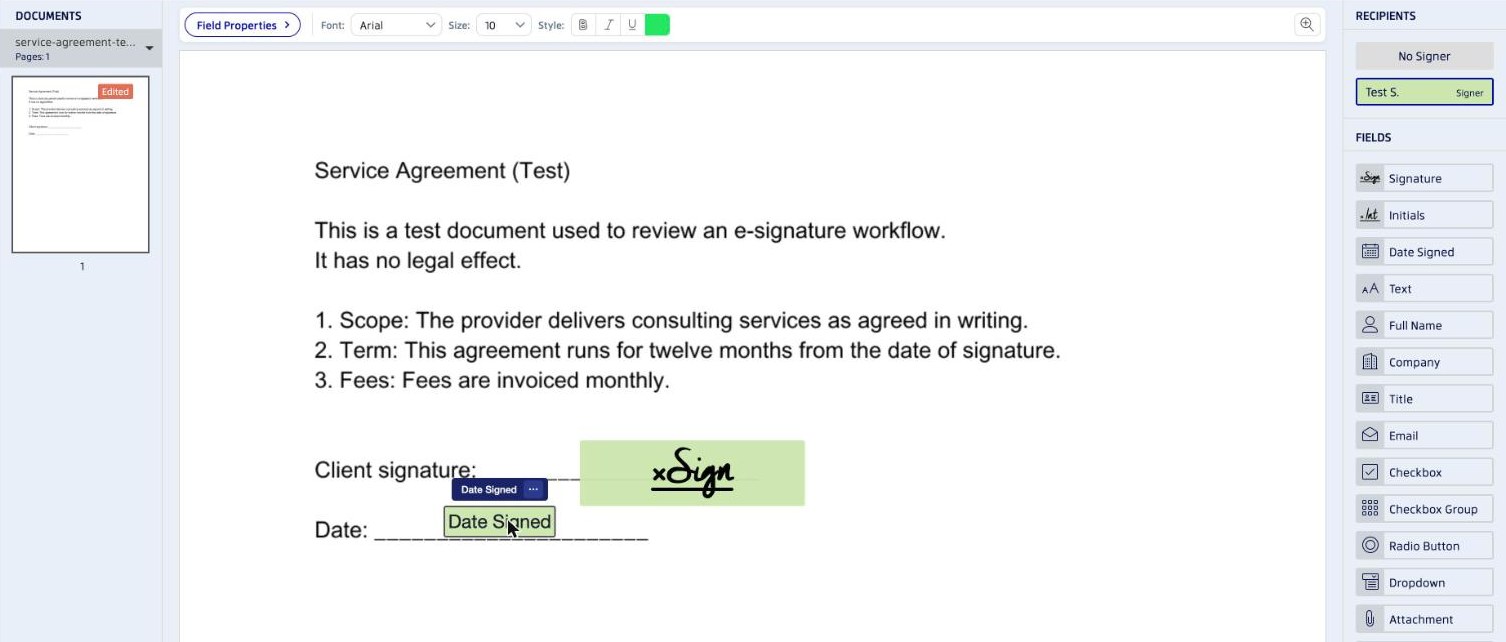
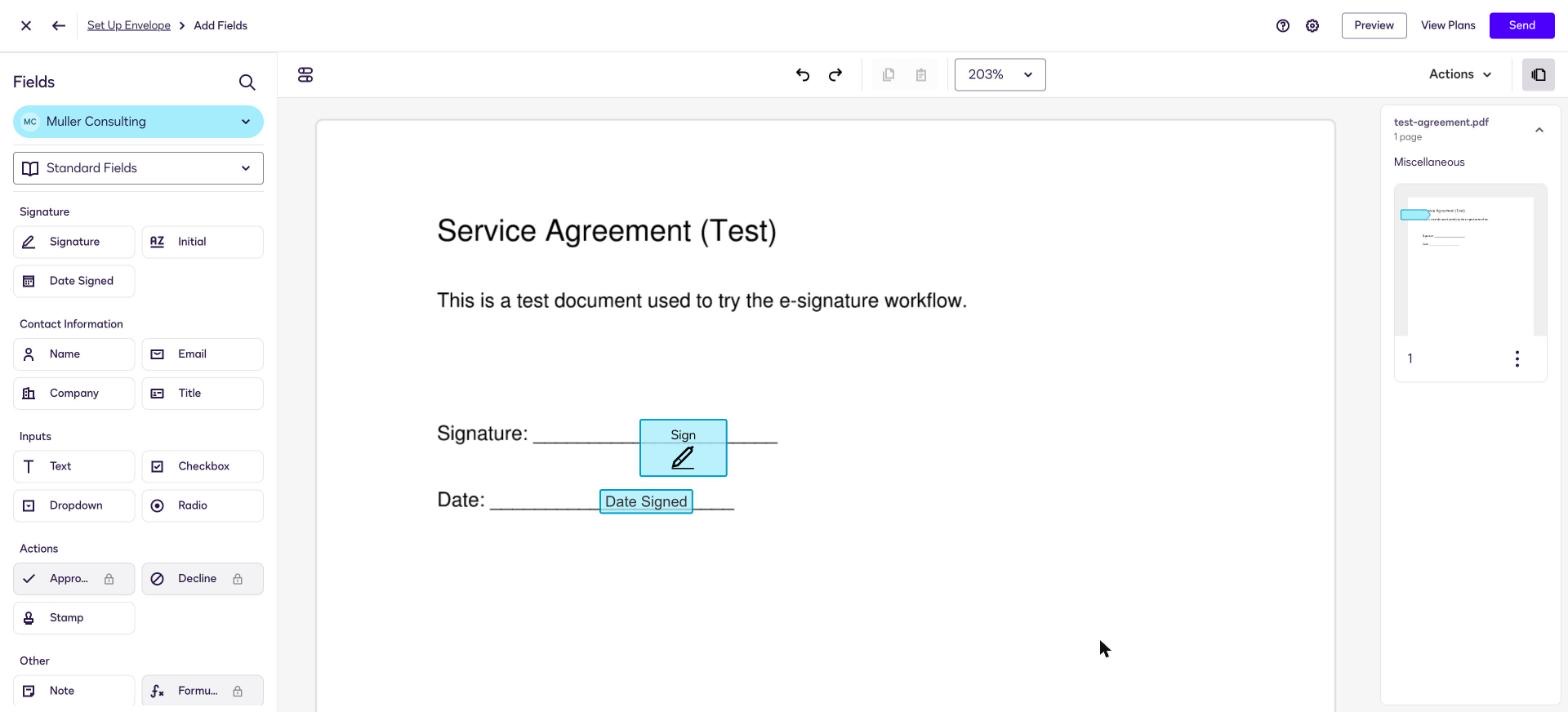
Our November 2026 test used three steps: Edit, Prepare and Review. Fields were placed by dragging and dropping. Each recipient could use SMS or PIN authentication, but only one method at a time.
Reminders were on by default after 3 days and again after 1 week. Our test agreement also had a 3-month expiry. The Date Signed field was already filled before signing.
Signers could type, draw or upload a signature. The audit trail contained a document ID, fingerprint and event history. Its PDF was digitally signed by eversign GmbH.
Sending With DocuSign
DocuSign required fields to be placed by hand in our test. AutoPlace worked from anchor text that we added ourselves.
The default envelope name was "Complete with Docusign: <file>". The request was also set to expire four months after sending without asking us first. These defaults are worth checking before sending a client agreement.
How the Signing Experience Compares With Sign.Plus
Sign.Plus uses Auto-Place to suggest fields immediately after upload, including on flat scans. This differs from adding your own anchor text before automatic placement.
Per-recipient checks include passcode, SMS code and ID Check. Every signed document comes with a Certificate of Completion.
7. Xodo Sign API vs DocuSign API
Xodo Sign provides a free sandbox, an API Light plan with a 50-document allowance and a custom API Business option. DocuSign provides a free developer sandbox and annual, per-account Developer plans called Starter, Intermediate and Advanced. Starter begins with 40 envelopes a month, while Advanced begins with 100.
DocuSign supports QES through the API on Enhanced. Sign.Plus lists Grow with 200 requests and Scale with 600 requests, and every Sign.Plus API plan supports SES, AES and QES.
These models use different allowances and billing terms, so compare expected production volume and required signature levels rather than treating each request or envelope as identical. See the published Sign.Plus API plans.
8. Single Sign-On (SSO)
SSO is not listed on the Xodo Sign pages we reviewed. DocuSign offers SSO on Enhanced and some IAM plans.
Sign.Plus includes SSO on Enterprise, alongside storage choice and HIPAA with Advanced Security Controls.
9. Contract Terms and Canceling
Xodo Sign subscriptions auto-renew. You can cancel at any time to stop future billing, but refunds are not provided except where mandatory law requires them. After termination, native files are available on request within 30 days. Its terms are governed by California law.
DocuSign annual plans can be canceled within 30 days without penalty, once per customer. After that window, the remainder of the annual term is owed.
The practical difference is flexibility after the initial cancellation window. Before choosing any of the three products, including Sign.Plus, read the current subscription, renewal and data-export terms.
Check Recent Xodo Sign and DocuSign Reviews
Search under both eversign and Xodo Sign, since older reviews may use the former name. Check the review date and whether the writer discusses current packaging rather than an older plan.
- "Xodo Sign reviews 2026"
- "eversign reviews 2026"
- "Xodo Sign billing and cancellation reviews"
- "DocuSign reviews 2026"
- "DocuSign envelope limit reviews"
- "DocuSign Enhanced QES HIPAA reviews"
Final Verdict: Xodo Sign vs DocuSign
Xodo Sign has a clear appeal for cost-conscious freelancers and small businesses: a free plan and unlimited documents on paid plans. Its limitations are equally important. No QES offering was found on the reviewed public pages, no customer-selectable storage region was published, and HIPAA requires a sales conversation. ISO 27001 was also not published on the reviewed product pages.
DocuSign advertises more than 1,000 prebuilt integrations. Its envelope metering requires closer volume planning, however, and US buyers must look to quote-based Enhanced for QES, residency and HIPAA.
Sign.Plus is the third option when you want unlimited signature requests, QES on every plan and published compliance packaging. It provides Swiss storage by default, 43 storage choices on Enterprise and a published Enterprise route to HIPAA.
Start a Sign.Plus free trial and compare its request model and signature options with your actual document workflow.
FAQs
Is eversign now Xodo Sign?

Is eversign free?
Is Xodo Sign better than DocuSign?
Is Xodo Sign cheaper than DocuSign?
Does Xodo Sign support QES?
Is Xodo Sign HIPAA compliant?

Featured Articles






Confédération Suisse
Confederazione Svizzera
Confederaziun Svizra
Swiss Confederation
Innosuisse - Swiss Innovation Agency



