


DocuSign Standard vs Business Pro vs Enhanced (2026): Pricing and Limits
Compare DocuSign Standard, Business Pro and Enhanced pricing, envelope limits and features, then see where Sign.Plus fits as a lower cost alternative for teams considering Standard or Business Pro.


- Standard costs $25 and Business Pro costs $40 per user per month with annual upfront billing. Both include 100 envelopes per user per year and support up to 50 users.
- Business Pro adds payment collection, PowerForms, web forms, bulk send, advanced form fields, a developer account and APIs, but its envelope allowance stays the same.
- Enhanced is the plan formerly sold as Enterprise. It uses contact sales pricing, supports 50+ users and adds custom envelope limits, SSO, data residency and HIPAA support through a BAA.
- Sign.Plus Professional is $19.99 and Business is $29.99 per user per month on annual billing. Both include unlimited signature requests, and Business adds bulk send, custom branding and Zapier.
- Sign.Plus Enterprise is $49.99 per user per month on annual billing and includes SSO, HIPAA support and storage choice. QES is available on every Sign.Plus plan for $5 per recipient, including identity verification.
This guide compares DocuSign Standard vs Business Pro on US pricing, envelope limits and features, then explains where Enhanced fits. If you are researching DocuSign Business Pro vs Enterprise, Enterprise is now sold as Enhanced. We also cover Sign.Plus as a lower-cost third option while keeping the feature differences clear. We tested DocuSign hands-on by sending a real test agreement, and we keep retesting its plans as they change.
DocuSign Plans at a Glance
| Plan detail | Standard | Business Pro | Enhanced |
|---|---|---|---|
| Price, annual upfront | $25 per user/month | $40 per user/month | Contact sales |
| Annual billed monthly | $30 per user/month, or $360 per user/year | $45 per user/month, or $540 per user/year | Contact sales |
| Month to month | $45 per user/month | $65 per user/month | Contact sales |
| Envelopes | 100 per user/year | 100 per user/year | Custom limits |
| Users | Up to 50 | Up to 50 | 50+ |
| What it adds | Team features over Personal, including branding, comments, scheduled sending, permissions, reports and shared templates | Payments, PowerForms, web forms, bulk send, advanced fields, a developer account and APIs | SSO, organization controls, advanced routing, data residency, additional compliance options and 24/7 live support |
| SSO, residency and HIPAA | Not included on this tier | Not included on this tier | SSO and access management, data residency, and HIPAA support through a BAA |
Which DocuSign Plan Should You Choose?
- Choose Standard if you need shared templates, custom branding, team permissions, reports and common workplace integrations, and 100 envelopes per user per year is enough.
- Choose Business Pro if you specifically need payment collection, PowerForms, web forms, bulk send, advanced form fields, or developer tools. It does not provide a higher standard envelope allowance.
- Choose Enhanced if you need custom envelope limits, support for 50+ users, SSO, data residency, HIPAA support through a BAA, advanced routing, or the other Enhanced-only controls described below.
How We Compared the DocuSign Plans
We read DocuSign's US plan page and comparison table and sent a test agreement in November 2026. We checked billing options, user and envelope limits, plan-only features, add-ons, eIDAS signature levels and cancellation terms. The hands-on observations below describe our test agreement. Sign.Plus comparisons use its published plan details.
1. DocuSign Standard vs Business Pro Pricing
DocuSign Pricing
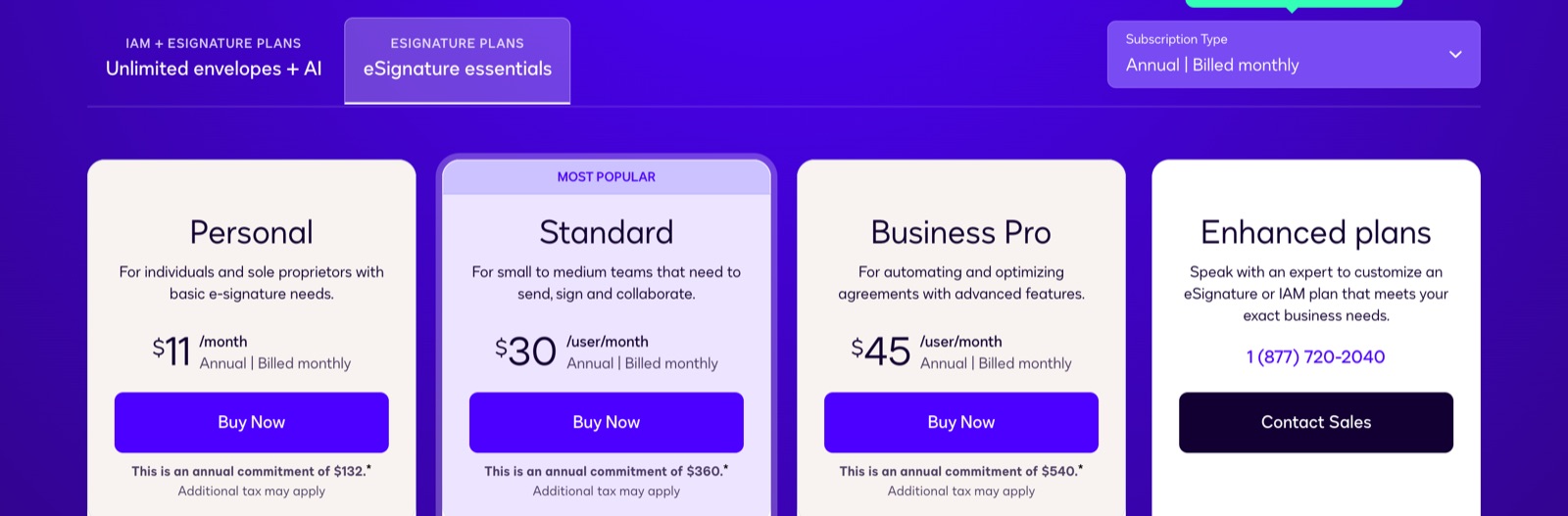
| Plan | Annual upfront | Annual billed monthly | Month to month | Users | Envelopes |
|---|---|---|---|---|---|
| Personal | $10/month | $11/month, or $132/year | $15/month | 1 | 5 per month |
| Standard | $25 per user/month | $30 per user/month, or $360 per user/year | $45 per user/month | Up to 50 | 100 per user/year |
| Business Pro | $40 per user/month | $45 per user/month, or $540 per user/year | $65 per user/month | Up to 50 | 100 per user/year |
| Enhanced | Contact sales | Contact sales | Contact sales | 50+ | Custom limits |
Annual upfront figures are monthly rates paid for the year upfront. Annual billed monthly is a separate annual billing option, not the same as a month-to-month subscription.
How Much More Does Business Pro Cost Than Standard?
Business Pro costs $15 more per user per month with either annual upfront or annual billed monthly pricing. With annual billed monthly, that is a difference of $180 per user over the year. Month-to-month Business Pro costs $20 more per user per month than Standard.
That premium buys additional features, not a larger standard envelope allowance. Both plans include 100 envelopes per user per year and support up to 50 users.
How DocuSign Pricing Compares With Sign.Plus
| DocuSign tier | DocuSign annual upfront price | Matching Sign.Plus plan | Sign.Plus annual price |
|---|---|---|---|
| Standard | $25 per user/month | Professional | $19.99 per user/month |
| Business Pro | $40 per user/month | Business | $29.99 per user/month |
| Enhanced | Contact sales for a quote | Enterprise | $49.99 per user/month |
Sign.Plus Professional has no user minimum. Sign.Plus Professional and Business are cheaper than DocuSign Standard and Business Pro, respectively, but these are not feature-for-feature matches. Enhanced is priced by quote, while Sign.Plus Enterprise has a published price of $49.99 per user per month on annual billing. DocuSign Business Pro genuinely adds payment collection, PowerForms, web forms, bulk send and APIs, which can justify its higher price when your team needs them.
2. Envelope Limits on Standard and Business Pro
How DocuSign Counts Envelopes
The DocuSign Business Pro envelope limit is the same as Standard's: 100 envelopes per user per year. Enhanced has custom envelope limits.
- An envelope counts when it is sent, whether or not it is signed.
- Voiding an envelope does not return it to your allowance.
- Bulk sends and API sends count.
- Overage is billed per envelope.
Estimate usage by sends, not completed agreements. Separate IAM plans add unlimited envelope sends, AI agreement management and Workflow Builder. Their prices are not covered in this guide.
How Sign.Plus Counts Signature Requests
Sign.Plus Professional includes unlimited signature requests. Business includes everything in Professional, so the same allowance applies there. This can make Professional or Business a better economic fit for frequent senders who do not need the features added on Business Pro.
Signature requests should not be confused with messaging allowances. Professional includes 10 SMS/WhatsApp requests per seat per month, while Business includes 30.
3. What Business Pro Adds Over Standard
Standard already adds substantial team functionality over Personal: custom branding, collaborative commenting, scheduled sending, in-person signing, pre-filled fields, a value calculator, user and group permissions, team reports, shared templates, shared documents and folders, delegated signing and custody transfer. It also includes Slack, Microsoft Teams, Zoom and Stripe integrations.
Business Pro adds the following features over Standard:
- Forms and data collection: drop-down and radio form fields, drawing fields, signer attachments, PowerForms, web forms and envelope custom fields.
- Payments and agreement handling: payment collection, agreement actions, managed stamps and eWitness. Payment collection is available only on Business Pro or Enhanced.
- Template and volume controls: locked templates and bulk send.
- Development and integrations: a developer account and APIs, plus 1000+ partner integrations.
Does Your Team Need Business Pro?
Stay with Standard when its sharing, branding, permissions and signing tools cover your work. Upgrade when at least one capability added on Business Pro is a firm requirement, particularly payments, PowerForms, web forms, bulk send or API access.
Do not upgrade simply to obtain more envelopes. The allowance remains 100 per user per year, and bulk or API sending can consume that allowance faster.
How Sign.Plus Business Compares
At $29.99 per user per month on annual billing, Sign.Plus Business includes everything in Professional and adds bulk send, custom branding and Zapier. Its Professional foundation provides unlimited signature requests, 10 templates, automatic reminders, passcode verification, in-person signing, public forms and signer attachments. Business also includes 30 SMS/WhatsApp requests per seat per month.
That makes it a lower-cost option for bulk sending and branding, but not a blanket substitute for Business Pro. Teams requiring DocuSign payment collection, PowerForms, drawing fields or eWitness should keep those requirements central. Sign.Plus offers separate API plans with published prices and monthly request allowances. Every API plan supports SES, AES and QES.
4. Business Pro vs Enhanced (Formerly Enterprise)
Enhanced is the plan formerly sold as Enterprise. It uses contact-sales pricing, supports 50+ users and offers custom envelope limits. The main reason to move beyond Business Pro is not more form fields. It is the set of administrative, routing, integration and compliance controls below.
What Only Enhanced Includes
- Access and administration: SSO and access management, organization management, Docusign Monitor, document retention policies and 24/7 live support.
- Routing and signing control: multi-channel delivery, conditional routing, delayed routing, supplemental documents, signing groups, document visibility and remote online notary.
- Authentication and business systems: knowledge-based authentication, Docusign Gen for Salesforce, and integrations to Salesforce, Microsoft Dynamics and NetSuite.
- Compliance and residency: data residency, HIPAA support through a BAA, FedRAMP Moderate, DoD IL4 and 21 CFR Part 11.
Enhanced data residency regions are the US, Canada, Europe, Australia and Japan. The region is set at account creation.
These are additions, not the entire security baseline. All DocuSign plans list ISO 27001, SOC 2 Type II, GDPR, WCAG 2.0 AA, a certificate of completion, email access codes, 44+ signing languages, a mobile app, an audit trail and reusable templates.
How Sign.Plus Enterprise Compares
Sign.Plus Enterprise costs $49.99 per user per month on annual billing. It includes storage choice across 43 locations, with documents able to move later, plus SSO and HIPAA support with Advanced Security Controls and a signed BAA. It also includes 150 SMS/WhatsApp requests per seat per month.
Sign.Plus stores data in Switzerland by default. Its assurance credentials include ISO/IEC 27001:2022 certification from EY CertifyPoint, a SOC 2 Type 2 report from EY and CSA STAR. Enterprise is an option when these controls match your needs, but its inclusion in this comparison does not mean it contains every Enhanced-only integration, routing feature or compliance item.
5. QES and eIDAS on DocuSign Plans
Which Signature Level Do You Need?
For teams signing in Europe, the eIDAS regulation defines three levels of electronic signature. Select the level required by the agreement and the applicable legal or policy requirements.
- Simple electronic signature, or SES
- Advanced electronic signature, or AES
- Qualified electronic signature, or QES
A higher level is not automatically necessary for every document. Confirm the requirement before paying for a higher plan or an add-on.
Which DocuSign Plans Include QES
On the US plan page reviewed, Personal, Standard and Business Pro list SES. Enhanced lists AES, SES and QES. Business Pro therefore does not add QES over Standard in that US listing.
European price lists offer QES as a paid add-on on Personal, Standard and Business Pro. Region and contract terms matter, so US buyers should not assume that the European add-on structure applies to their purchase.
How DocuSign QES Compares With Sign.Plus
Sign.Plus offers QES on every plan, including Free, through Swisscom Trust Services under eIDAS and ZertES. QES costs $5 per recipient, including identity verification, and purchased credits never expire. This makes QES available without an Enhanced quote, although teams should still confirm the required level for each agreement. See the Sign.Plus eIDAS signature guide for the product details.
6. Signer Verification and Add-Ons
DocuSign Standard and Business Pro include five SMS deliveries and five identity verifications as a one-time bonus. Listed add-on pricing starts at $0.36 per SMS delivery and $2.40 per ID verification attempt. Include these usage-based costs in your budget alongside any envelope overage.
SMS and phone authentication are separate from SMS delivery. They require contacting sales on Business Pro and Enhanced and are not available on Standard.
Sign.Plus Professional includes passcode verification, and Business includes it through the Professional feature set. ID Check costs $2 per check. Monthly SMS/WhatsApp allowances are 10 requests per seat on Professional, 30 on Business and 150 on Enterprise.
7. Signing Experience: What We Saw Hands-On
Sending With DocuSign
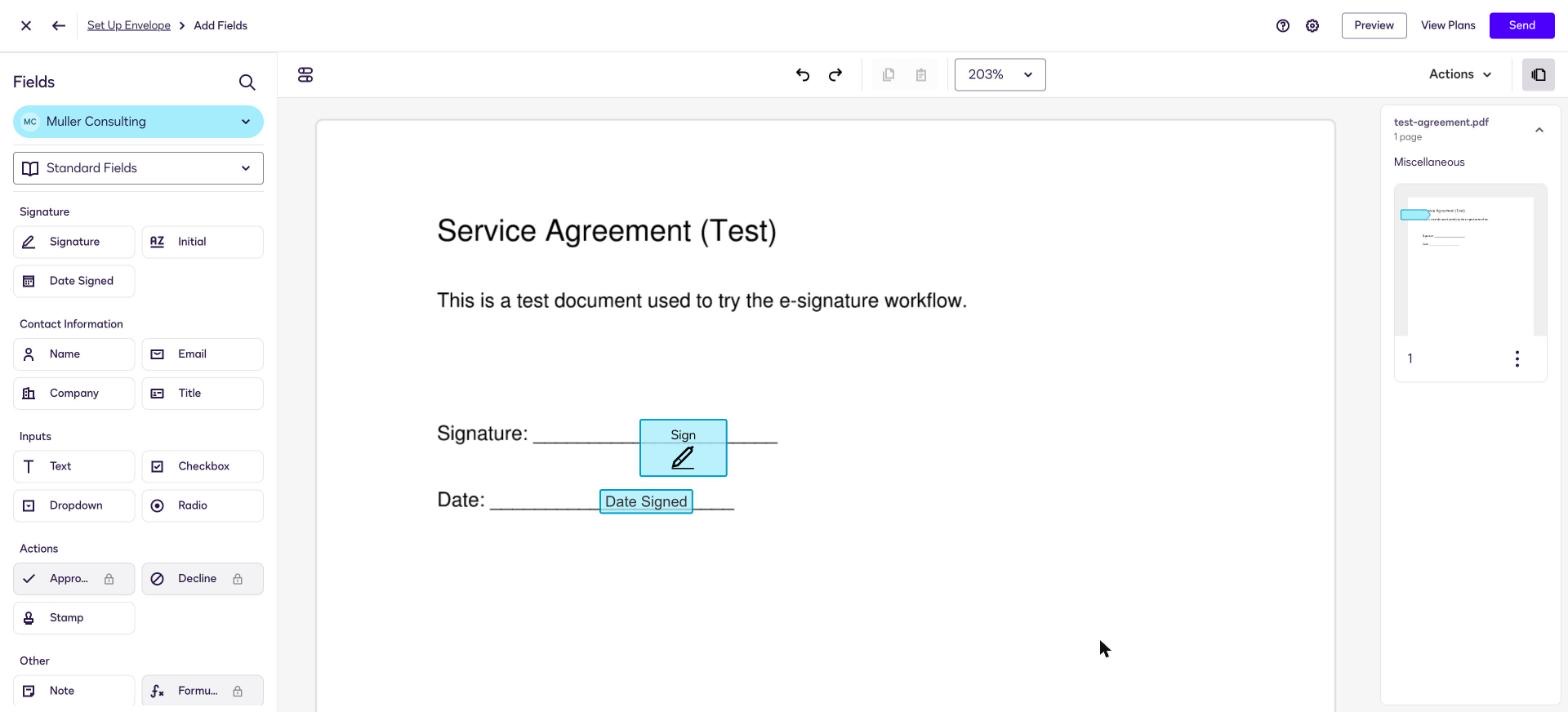
In our November 2026 test, we placed fields by hand. DocuSign AutoPlace worked from anchor text we added ourselves. The default envelope name was "Complete with Docusign: <file>", and the request was set to expire four months after sending.
These details are worth checking when estimating template preparation and ongoing sending work, particularly if your team repeats the same agreement process.
How the Signing Experience Compares With Sign.Plus
Sign.Plus Auto-Place suggests fields right after upload. That provides a different starting point from manual field placement or preparing anchor text. Suggested fields should still be reviewed before sending.
Sign.Plus provides a Certificate of Completion with every signed document, and Professional includes automatic reminders. DocuSign also includes a certificate of completion and audit trail on all plans. The practical comparison is therefore about preparation tools, plan-specific form features and total cost, not whether either product supplies basic proof of signing.
8. Contract Terms and Canceling
DocuSign annual plans can be canceled within 30 days without penalty, once per customer. After that, the remaining balance of the annual subscription is owed. Subscriptions renew.
Annual billed monthly should not be confused with month-to-month service. Before committing, model the full year at your actual user count and include expected envelope overage, SMS delivery and identity verification. For Enhanced, use the quote to confirm custom envelope limits and the controls your organization requires.
Final Verdict: DocuSign Standard vs Business Pro
Standard is the sensible default for teams that need shared templates, branding, permissions and reports without the tools added on Business Pro. Business Pro earns its higher price when payments, PowerForms, web forms, bulk send, advanced fields or APIs are real requirements. Enhanced is the appropriate comparison when SSO, data residency, HIPAA support, advanced routing or custom envelope limits drive the purchase.
Sign.Plus is the lower-cost third option for the Standard and Business Pro comparisons: Professional at $19.99 against Standard and Business at $29.99 against Business Pro, both on annual billing. Enhanced is priced by quote, while Sign.Plus Enterprise has a published price of $49.99 per user per month on annual billing. It fits best when its own feature set matches yours, including unlimited signature requests on Professional and Business, bulk send on Business, QES on every plan, or SSO, HIPAA support and storage choice on Enterprise.
It is not a feature-for-feature replacement for every DocuSign plan. Compare your required features first, then compare annual cost and usage charges. You can start a Sign.Plus free trial to test the fit.
FAQs
How much is DocuSign Business Pro?

What are the levels of DocuSign plans?
What is included in DocuSign Standard?
What is the difference between DocuSign Business Pro and Enterprise?
How many envelopes does DocuSign Business Pro include?
Is DocuSign overpriced?

Featured Articles






Confédération Suisse
Confederazione Svizzera
Confederaziun Svizra
Swiss Confederation
Innosuisse - Swiss Innovation Agency



