


DocuSeal vs DocuSign (2026): Pricing, QES, Hosting and API Guide
Compare DocuSeal and DocuSign on pricing, self hosting, QES, storage, HIPAA, APIs and mobile apps, with Sign.Plus as a fully hosted third option for US small teams and developers.


- DocuSeal is open source and offers US or EU cloud hosting or self hosted deployment, while DocuSign is cloud only.
- DocuSeal Pro includes unlimited signature requests, while DocuSign Standard and Business Pro include 100 envelopes per user per year.
- DocuSeal AES and QES are available on its European Cloud, with country specific methods and possible support enablement, while DocuSign lists QES on Enhanced in the US.
- DocuSeal has no native mobile app, DocuSign lists a mobile app on all plans, and Sign.Plus offers native iOS and Android apps.
- Sign.Plus is fully hosted and Swiss, with QES on every plan through Swisscom Trust Services and 43 storage locations on Enterprise.
DocuSeal vs DocuSign is a choice between an open-source signing tool with cloud and self-hosted options and a cloud-only incumbent with metered envelopes. This 2026 comparison focuses on US small teams and developers. Sign.Plus, our product, is included as a fully hosted third option. We tested DocuSeal and DocuSign hands-on by sending a real test agreement through each, and we keep testing both as they change.
DocuSeal vs DocuSign at a Glance
| Feature | DocuSeal | DocuSign | Sign.Plus |
|---|---|---|---|
| Pricing model | Free plan and per-user Pro plan | Per user; metered envelopes; Enhanced by quote | Per user; published plans |
| Sending limit | Unlimited signature requests on Pro | Personal: 5 envelopes per month. Standard and Business Pro: 100 per user per year | Unlimited signature requests on Professional, Business and Enterprise |
| Hosting | US or European Cloud, or self-hosted with Docker | Cloud only | Fully hosted |
| QES | European Cloud; custom setup through support on the US cloud | Listed on Enhanced in the US; paid add-on on lower plans in European price lists | Every plan, including Free, through Swisscom Trust Services |
| Storage region | AWS Virginia, AWS Dublin or your own servers | Five residency regions on Enhanced, set at account creation | Switzerland by default; 43 locations on Enterprise |
| Mobile apps | No native app; progressive web app and QR handoff | Mobile app on all plans | Native iOS and Android apps |
| Company | DocuSeal, LLC; terms under Delaware law | DocuSign, Inc., San Francisco | Alohi, Geneva; Swiss company |
DocuSeal offers deployment control, while DocuSign concentrates advanced requirements in Enhanced. Sign.Plus is the third option for teams that want hosted delivery, QES on every plan and native mobile apps.
DocuSeal or DocuSign: Which Should You Choose?
For DocuSign vs DocuSeal, neither product is universally better. The deciding factors are who operates the service, how much you send and where your required features sit.
- Choose DocuSeal if open-source code and deployment control matter most. You can operate it yourself or use its US or European Cloud.
- Choose DocuSign if you want its established cloud service, mobile app and Business Pro integration and API features, and its envelope allowances fit your volume.
- Consider Sign.Plus if you want nothing to run, QES through one provider on every plan, Swiss default storage and native iOS and Android apps.
What Are DocuSeal and DocuSign?
DocuSeal
DocuSeal is an open-source document signing tool from DocuSeal, LLC, with source code on GitHub. It can run as a vendor-hosted cloud service in Virginia or Dublin, or on your own servers with Docker. Its Pro plan adds unlimited signature requests, branding, team features, integrations, SSO/SAML, API access and embedding.
DocuSign
DocuSign eSignature is a cloud-only product from DocuSign, Inc. in San Francisco. US plans run from single-user Personal to Standard, Business Pro and quote-based Enhanced. Separate IAM plans add AI agreement management, Workflow Builder and unlimited envelope sends. IAM prices are not covered here.
What Is the Main Difference?
DocuSeal can be software you operate, with a per-user Pro plan and unlimited signature requests. DocuSign is a hosted service that counts envelopes and reserves several advanced features for Enhanced. Sign.Plus is also fully hosted, but it is Swiss, offers QES on every plan and provides native mobile apps.
How We Compared DocuSeal and DocuSign
We read vendor pages and sent a test agreement through each in November 2026. Our DocuSeal hands-on test used the European Cloud. We compared pricing, sending limits, hosting, QES, storage, compliance, signing, API access, mobile support and contract terms.
Sign.Plus was assessed against the same categories. Because it is our product, we have kept the competitor hands-on observations separate from its published product details.
1. DocuSeal vs DocuSign Pricing
DocuSeal Pricing
DocuSeal pricing has hosted cloud and on-premises tracks. A free plan exists.
| Deployment | Offer | Price | Included or required |
|---|---|---|---|
| Cloud | Pro | $20 per user per month, or $200 per user per year | Unlimited requests, branding, reminders, payments, bulk send, Zapier, Make, webhooks, teams, SSO/SAML, API and embedding |
| Cloud | API and embedding usage | $0.20 per document signed in production | Requires Pro; free unlimited sandbox |
| On-premises | Open-source edition | Free | Your own SMTP and GitHub community support |
| On-premises | Pro license | $20 per user per month | White-label, SSO/SAML, SMS through Twilio or webhook, API and account manager |
Cloud Pro includes 20 SMS identity verification messages, then charges $0.20 per SMS. It also includes personalized emails, user roles and an account manager.
DocuSign Pricing
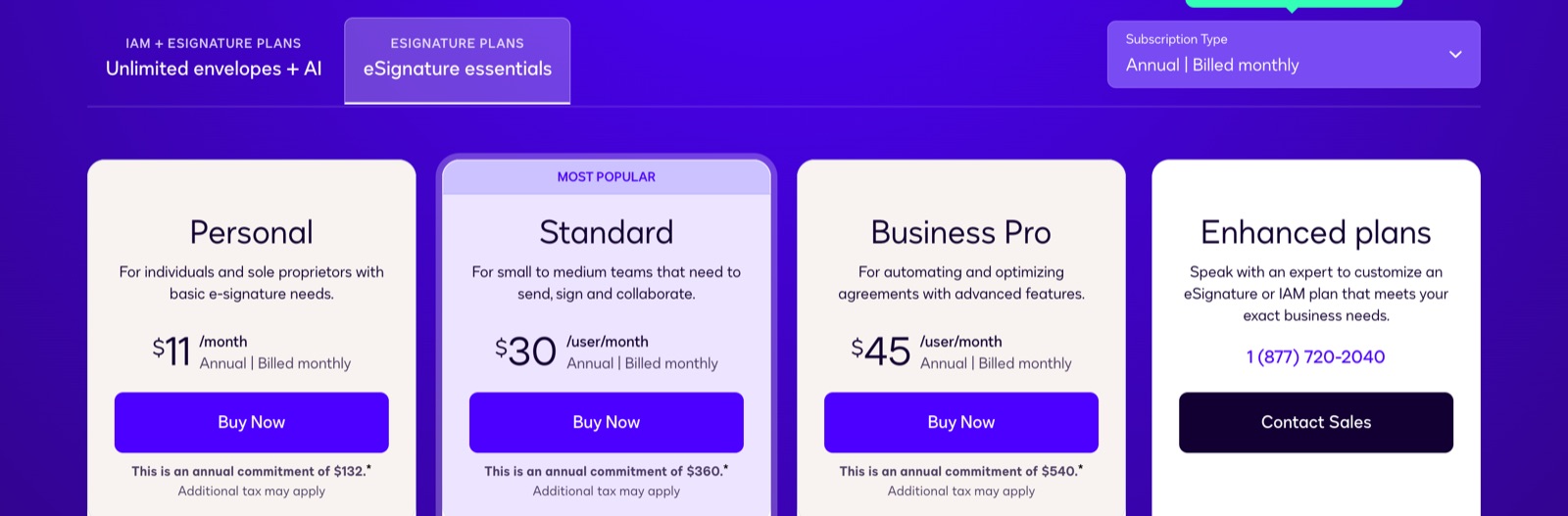
| Plan | Annual paid upfront | Annual billed monthly | Month to month |
|---|---|---|---|
| Personal | $10 per month | $11 per month, or $132 a year | $15 per month |
| Standard | $25 per user per month | $30 per user per month, or $360 per user per year | $45 per user per month |
| Business Pro | $40 per user per month | $45 per user per month, or $540 per user per year | $65 per user per month |
| Enhanced | Contact sales | Contact sales | Contact sales |
Personal is limited to one user and five envelopes per month. Standard and Business Pro support up to 50 users and include 100 envelopes per user per year. Enhanced is for 50 or more users and has custom envelope limits.
An envelope counts when sent, whether or not it is signed. Voiding does not return it. Bulk and API sends count, and overage is billed per envelope.
Standard and Business Pro add branding, shared templates, permissions and workplace integrations over Personal. Business Pro adds bulk send, PowerForms, payment collection, web forms and APIs. Enhanced adds SSO, data residency, HIPAA support and 24/7 live support. See our DocuSign Standard vs Business Pro guide for the tier breakdown.
SMS delivery starts at $0.36 per delivery, and ID verification starts at $2.40 per attempt. Standard and Business Pro include five SMS deliveries and five identity verifications as a one-time bonus.
How Much Does DocuSeal Cost Compared With DocuSign?
DocuSeal Pro lists at $20 per user per month or $200 per user per year. DocuSign Standard lists at $25 per user per month with annual payment upfront, while Business Pro is $40 on that basis. DocuSign Personal has a lower $10 entry price, but it is limited to one user and five envelopes per month.
DocuSeal Pro includes unlimited signature requests. DocuSign Standard and Business Pro meter envelopes. Total cost also depends on DocuSeal hosting and usage charges, or DocuSign overages, add-ons and any Enhanced quote.
How DocuSeal and DocuSign Pricing Compare With Sign.Plus
On annual plans, Sign.Plus Professional is $19.99 per user per month, Business is $29.99 and Enterprise is $49.99. Professional is below DocuSign Standard's $25 annual-upfront rate, and Business is below Business Pro's $40 rate. Those Sign.Plus plans include unlimited signature requests, while the two DocuSign plans meter envelopes. Professional has no user minimum.
For DocuSeal, the Sign.Plus comparison is about what is included rather than a price claim. Sign.Plus includes fully hosted operation, native apps and QES on every plan through one provider. There are no servers for the customer to install or maintain.
2. Self-Hosting vs Cloud
Running DocuSeal on Your Own Servers
DocuSeal's open-source edition runs with Docker, uses your own SMTP and relies on GitHub community support. The on-premises Pro license adds white-labeling, SSO/SAML, SMS options, API access and an account manager.
Self-hosting gives you control over the deployment, but you run, update, back up and secure the servers yourself. Teams without that operational capacity can use DocuSeal's US or European Cloud instead.
DocuSign Is Cloud Only
DocuSign does not offer a self-hosted deployment in this comparison. That removes customer server maintenance, but region, identity and compliance options depend on the plan. Data residency, SSO and HIPAA support through a BAA are Enhanced features.
How Hosting Compares With Sign.Plus
Sign.Plus is fully hosted, with nothing to install or maintain. It is operated by Alohi, a Swiss company based in Geneva. Documents are stored in Switzerland by default under Swiss FADP. It is an alternative for teams that want hosted operation without managing DocuSeal infrastructure.
3. QES and eIDAS: DocuSeal vs DocuSign
Which Signature Level Do You Need?
For European use cases, the eIDAS regulation defines three levels of electronic signature. Your legal or compliance team should determine which level applies to the document and jurisdiction.
- SES: Simple Electronic Signature.
- AES: Advanced Electronic Signature.
- QES: Qualified Electronic Signature.
The product question is which plan, region and provider can supply the required level.
How DocuSeal Handles QES
DocuSeal offers AES and QES on its European Cloud. On its US cloud, they are available only through a custom setup arranged with support.
Signatures are paid per signature, with the price depending on the signing method and provider. Methods vary by country and include national ID cards, Smart-ID, itsme and various trust service providers. Some providers are switched off for new accounts and must be enabled by support. Charges are billed monthly and are non-refundable.
How DocuSign Handles QES
In the US plan list, Personal, Standard and Business Pro list SES. Enhanced lists SES, AES and QES and requires contacting sales. European price lists differ: they offer QES as a paid add-on on Personal, Standard and Business Pro. US buyers should therefore distinguish the published US plan structure from European offerings.
How DocuSeal and DocuSign QES Compare With Sign.Plus
Sign.Plus offers QES on every plan, including Free, through Swisscom Trust Services. One provider supports eIDAS and ZertES, without a region switch or support enablement. QES costs $5 per recipient, including identity verification, and credits never expire. This is a single published route, unlike DocuSeal's country-specific setup and DocuSign's US Enhanced listing.
4. Where Your Documents Live
DocuSeal
The US cloud is hosted on AWS US East in Virginia. The European Cloud is hosted on AWS EU in Dublin. On-premises deployments use the servers and storage environment you provide.
DocuSeal has no EU establishment of its own. Its GDPR Article 27 representative in the EU and UK is a third party.
DocuSign
DocuSign data residency is an Enhanced feature. Available regions are the US, Canada, Europe, Australia and Japan, and the region is set at account creation. It is not listed as a Standard or Business Pro feature.
How Their Storage Options Compare With Sign.Plus
Sign.Plus stores documents in Switzerland by default under Swiss FADP, with EU adequacy. Enterprise customers can choose among 43 storage locations, and documents can move later. That combines a hosted service with explicit storage choice, without requiring a self-hosted deployment.
5. HIPAA and Security Certifications
DocuSeal
DocuSeal claims SOC 2, with a Type II report available on request, plus ISO 27001, GDPR, ESIGN/UETA, eIDAS and 21 CFR Part 11. HIPAA support with a BAA is arranged through support and is not on by default.
DocuSign
All DocuSign eSignature plans list ISO 27001, SOC 2 Type II, GDPR and WCAG 2.0 AA. HIPAA support through a BAA is reserved for Enhanced. Enhanced also lists FedRAMP Moderate, DoD IL4 and 21 CFR Part 11. SSO and access management are also Enhanced features.
How Their Compliance Compares With Sign.Plus
Sign.Plus lists ISO/IEC 27001:2022 certification from EY CertifyPoint, a SOC 2 Type 2 report from EY and CSA STAR listing. Its published Enterprise plan includes HIPAA with Advanced Security Controls and a signed BAA, alongside SSO. That provides a published-plan route rather than DocuSign's quote-based Enhanced route or DocuSeal's support-enabled BAA.
6. Signing Experience: What We Saw Hands-On
Sending With DocuSeal
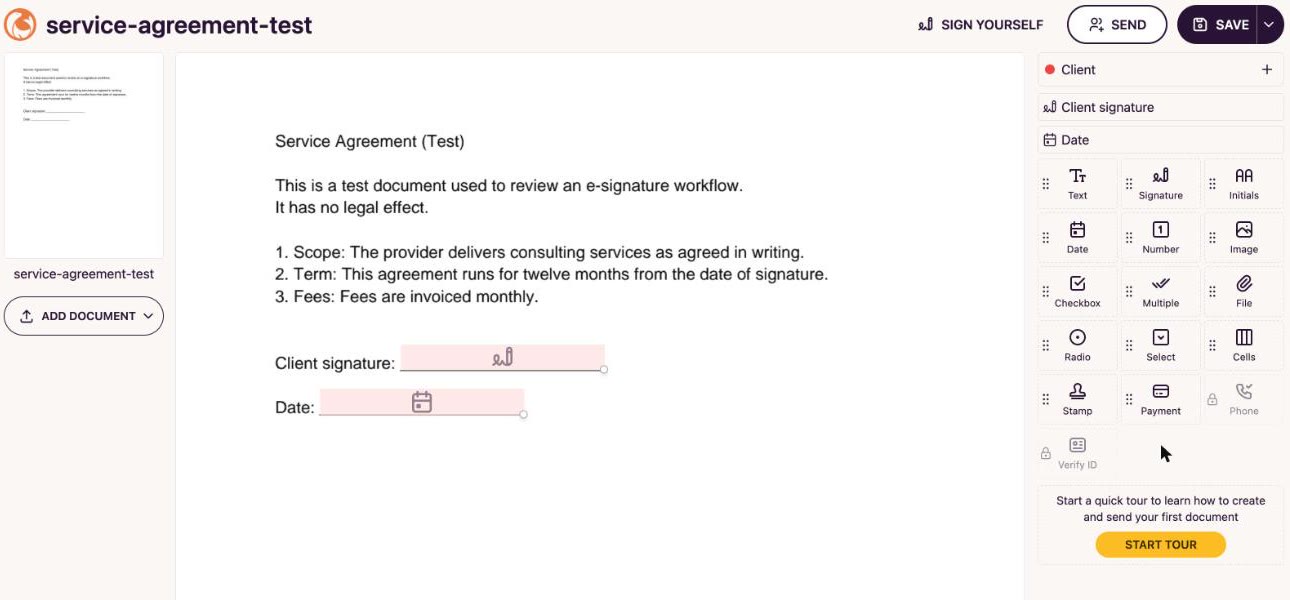
Uploading opened our PDF as a template in the field editor. Available field types included text, signature, initials, date, number, image, checkbox, file, radio, select, stamp and payment. "Autodetect fields" placed a signature and date field from the document's signature lines within a few seconds. Before the first send, DocuSeal asked us to verify the account email with a one-time code.
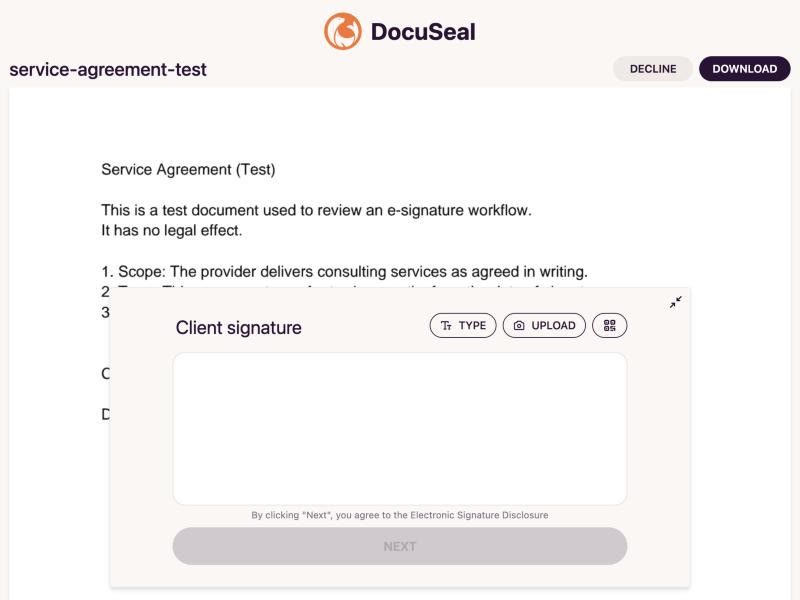
The signer needed no account and had Decline and Download buttons. Signatures could be drawn, typed, uploaded or completed through a QR code handoff to a phone. A very short drawn stroke was not accepted.
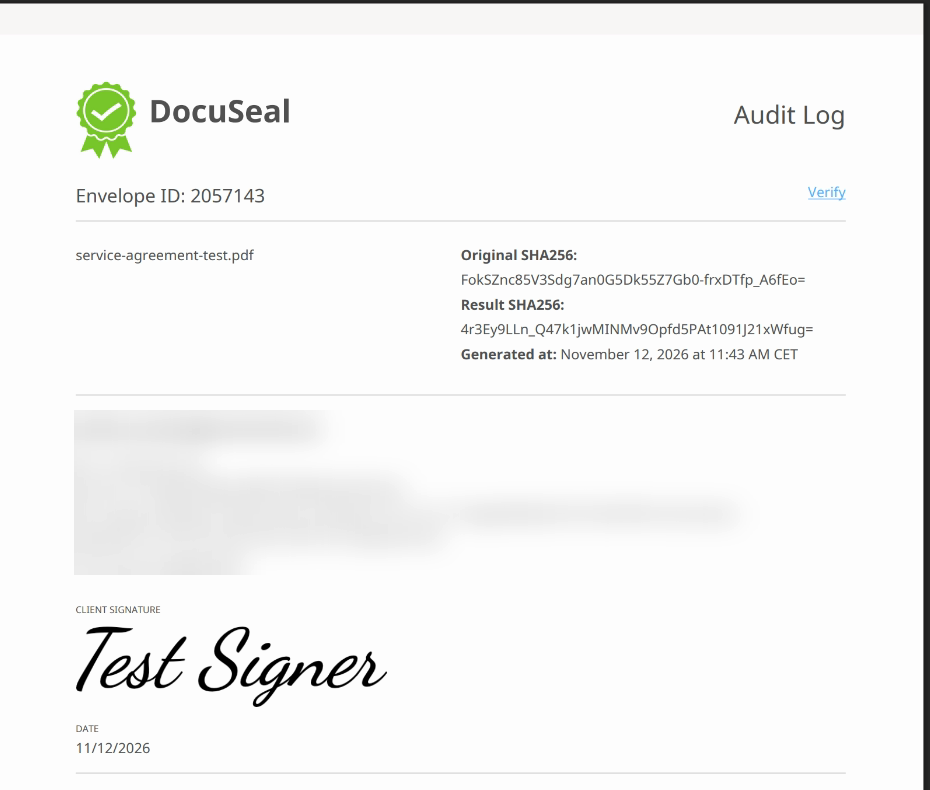
The date field was not prefilled; the signer could pick a date or select "Set Today." The picker showed dd.mm.yyyy, while the document and audit log printed 11/12/2026. The audit log PDF included the envelope ID, verification link, SHA256 hashes, signer email, IP address, user agent and event timeline.
Sending With DocuSign
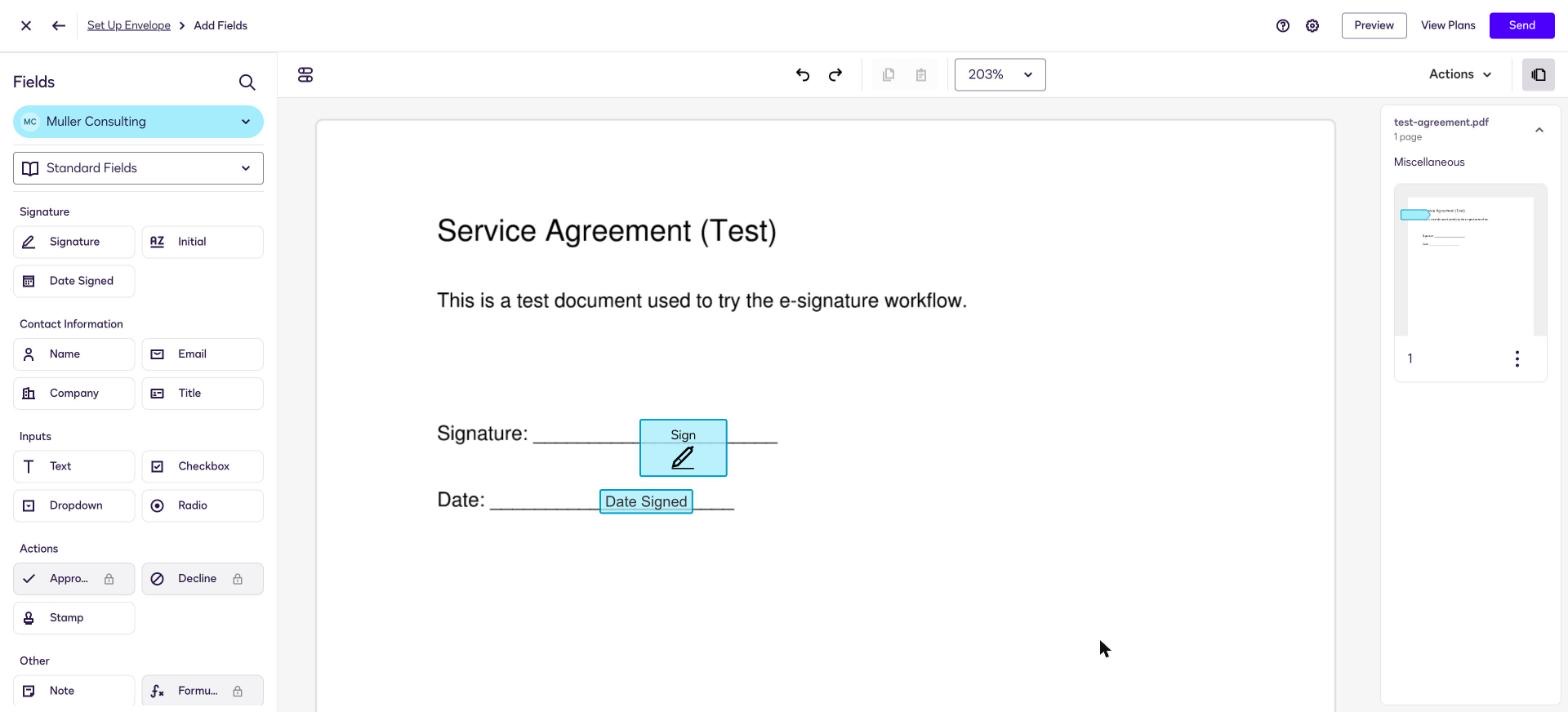
In our DocuSign test, fields were placed by hand. AutoPlace works from anchor text that you add to the document yourself. The default envelope name was "Complete with Docusign: <file>". The request was set to expire four months after sending without the send flow asking us.
Across its plans, DocuSign lists reusable templates, an audit trail, a certificate of completion and 44 or more signing languages.
How the Signing Experience Compares With Sign.Plus
Sign.Plus includes Auto-Place, which suggests fields right after upload, including on flat scans. This is not a dividing line by itself: DocuSeal's Autodetect also worked quickly in our test, while DocuSign's AutoPlace uses anchors you supply.
Sign.Plus also provides per-recipient passcode, SMS code and ID Check options. Every signed document includes a Certificate of Completion. It is the hosted third option to include in a hands-on trial.
7. DocuSeal API vs DocuSign API
DocuSeal's cloud API and embedding require Pro. Production use is charged per signed document, while the sandbox is free and unlimited. On-premises Pro also includes API access. Cloud Pro adds webhooks, Zapier and Make.
DocuSign Business Pro includes a developer account and APIs; they are not part of Standard's listed feature set. Bulk and API sends count against envelope allowances. DocuSign's separate IAM plans include unlimited envelope sends, but their prices are outside this comparison.
Sign.Plus publishes separate API plans. Grow is $279.99 per month with 200 requests, and Scale is $659.99 per month with 600 requests. Every API plan supports SES, AES and QES. See the Sign.Plus API pricing for the third-option comparison.
8. Mobile Apps
DocuSeal has no native mobile app. It provides a progressive web app, and signers can switch to a phone through a QR code. DocuSign lists a mobile app on all plans.
Sign.Plus offers native iOS and Android apps. Teams that require native apps alongside a fully hosted service can consider it as the third option.
9. Contract Terms and Support
DocuSeal's terms are governed by Delaware law and include binding individual AAA arbitration. The open-source edition uses GitHub community support, while Pro includes an account manager.
DocuSign subscriptions renew. Annual plans can be canceled within 30 days without penalty, once per customer. After that, the remaining balance of the annual subscription is owed. Enhanced includes 24/7 live support.
Sign.Plus provides published hosted plans, and its QES credits never expire. As with either competitor, buyers should review current renewal, cancellation and support terms before committing. Sign.Plus remains the third option for teams that want hosted operation and QES on every plan.
Check Recent DocuSeal and DocuSign Reviews
Use search prompts that identify the deployment, plan and feature being discussed:
- "DocuSeal self hosted review 2026"
- "DocuSeal European Cloud QES review"
- "DocuSign 100 envelope limit review"
- "DocuSign Enhanced HIPAA QES review"
Check the review date and whether the writer used cloud or on-premises deployment. A QES experience in one country may not describe another provider or method. For the third option, search "Sign.Plus QES review" and "Sign.Plus Enterprise storage review," then verify current plan details.
Final Verdict: DocuSeal vs DocuSign
DocuSeal suits teams that value open source, self-hosting and unlimited Pro signature requests, and that can handle its regional QES setup and lack of a native mobile app. DocuSign suits teams that want its cloud ecosystem and all-plan mobile app, provided envelope limits and Enhanced gating fit their needs.
Sign.Plus is the third option for teams that want nothing to run, Swiss default storage, QES on every plan through one provider, native apps and HIPAA on a published plan. Enterprise adds a choice of 43 storage locations.
For wider context, read our DocuSeal alternatives guide. To test the hosted option yourself, start a Sign.Plus free trial.
FAQs
Is DocuSeal better than DocuSign?

Is DocuSeal cheaper than DocuSign?
Is DocuSeal free?
Is DocuSeal legally binding?
Can you self-host DocuSeal?
Does DocuSeal support QES?

Featured Articles






Confédération Suisse
Confederazione Svizzera
Confederaziun Svizra
Swiss Confederation
Innosuisse - Swiss Innovation Agency



