


SignNow Review 2026: Every Plan, Invite Limits, and the Best SignNow Alternatives
SignNow prices its plans per account with unlimited users, but every self-serve plan shares one allowance of signature invites. We compared every plan, how invites are counted, signer authentication, QES, data residency, HIPAA, the API and the contract terms, and ranked the best SignNow alternatives for 2026.


- SignNow Business, Business Premium and Enterprise cost $8, $20 and $30 per month on annual billing, per account with unlimited users. The Site License is $1.50 per signature invite.
- Annual plans include 100 signature invites per account per year, and declined or canceled invites still count.
- Password, SMS and phone signer authentication start on Enterprise; we did not see a government ID check.
- QES, SSO and HIPAA support are on the Site License only, with QES and HIPAA as paid add-ons.
- Sign.Plus is our winner: a Swiss company that stores documents in Switzerland by default, with unlimited requests on Professional at $19.99 and eIDAS and ZertES qualified signatures at $5 on every plan, including Free.
SignNow is a US e-signature platform that prices its plans per account and shares a yearly invite allowance across users.
Is SignNow Worth It in 2026?
SignNow makes sense for a small team that signs only a handful of simple agreements a year. Plans are priced per account with unlimited users, so a whole office can share one low monthly fee.
It gets harder to justify once signing becomes routine. Every self-serve plan shares one allowance of 100 signature invites per account per year on annual billing, and declined or canceled invites still count. Signer verification starts on Enterprise, while qualified signatures, single sign-on, HIPAA support and full API access sit on the Site License, priced per invite.
SignNow Pros and Cons
Pros
- Plans are priced per account, with unlimited users.
- Low entry price: Business costs $8 per month on annual billing.
- Can suggest signature and text fields automatically after upload.
- 7-day free trial and a 30-day money-back guarantee on first online purchases.
- ISO 27001 and SOC 2 Type II listed on every plan.
Cons
- Annual plans share 100 signature invites per account per year.
- Declined and canceled invites count against the allowance.
- Password, SMS and phone signer authentication start on Enterprise at $30 per month.
- QES, SSO and HIPAA support are on the Site License only; QES and HIPAA are paid add-ons.
- Full API access is not included on Business, Business Premium or Enterprise.
What Is SignNow?
SignNow, also sold as airSlate SignNow, is the e-signature product of airSlate, Inc., a US company with its legal department in Brookline, Massachusetts. airSlate also owns pdfFiller, DocHub, US Legal Forms and Instapage.
SignNow sells e-signatures in two ways: eSignature plans for teams that send documents from the web app, and separate API plans for developers who build signing into their own software. The plan names have changed more than once, so older comparison articles may list Starter, Professional and Business instead.
Which SignNow Product Is Which?
| Name you see | What it is | Price |
|---|---|---|
| Business, Business Premium, Enterprise | eSignature plans for sending from the web app, priced per account | Published, from $8/mo |
| Site License | eSignature plan with custom volume, SSO and add-ons | $1.50 per signature invite or quote |
| API plans (Dev Mode, Trial, Professional, Enterprise) | Plans for building signing into your own software | Published, from $84/mo |
| airSlate SignNow | The same product under its parent company name | Same as above |
How We Compared These Services
E-signature is what we work on every day. We build and run Sign.Plus for everyone from freelancers and small offices to healthcare providers, law firms and international companies, and we follow the other platforms on this list closely. The questions below are the ones teams ask most often when they compare tools or move away from one.
For this guide we read SignNow's eSignature and API pricing pages, their plan comparison tables and FAQs, its security page, its Terms of Service and its contracting entity table. We also tested SignNow hands-on and rechecked every price on the vendors' own pages in November 2026. Where a capability is marked as not published, the vendor does not state it on its own pages. That makes it a question to settle with their sales team, not proof that it is missing.
1. SignNow Pricing: Every Plan
SignNow publishes prices for three self-serve plans and prices its Site License per signature invite. Annual billing is the cheapest option; the page says you save up to 60% compared with monthly billing.
Our advice: before you compare plans, count how many signature requests your whole team sends in a year. On SignNow, that number matters more than the number of users.
How to Read SignNow's Plans
Four things on the page decide what you will actually pay:
- The account, not the user, is the unit. Prices cover the whole account with unlimited users, and so does the invite allowance.
- The invite allowance is shared. Annual plans include 100 signature invites per account per year; monthly plans include 10 per account per month.
- Going over switches you to pay as you go. Each extra invite is billed separately, at a rate that depends on the plan, up to $3.60 on Enterprise.
- The Site License unlocks the compliance features. QES, SSO, HIPAA support and full API access sit on the Site License, priced at $1.50 per signature invite.
SignNow Plans
| Plan | Annual (per month) | Monthly | Users | Signature invites |
|---|---|---|---|---|
| Business | $8 | $20 | Unlimited | 100 per account per year (annual), 10 per month (monthly) |
| Business Premium | $20 | $30 | Unlimited | Same |
| Enterprise | $30 | $50 | Unlimited | Same |
| Site License | $1.50 per signature invite | Quote | Unlimited | Custom volume |
What this means for you. Business is an inexpensive way to get a few documents signed, and every plan includes unlimited templates and mobile apps. Business Premium adds bulk send, signing links, payments and US or EU storage. Enterprise adds custom branding, SMS delivery and signer authentication. None of the three raises the invite allowance: a five-person team on Enterprise shares the same 100 invites a year as one person on Business, about 20 each, or fewer than two a month.
Is SignNow Free?
No. SignNow offers a 7-day free trial, and first-time online buyers can ask for a refund within 30 days of the invoice. There is no free plan for sending; the free developer account is for testing the API only. Sign.Plus has a free plan with three signature requests in total, so you can try sending real documents before you pay.
How SignNow Pricing Compares
The card price is only part of the cost. What matters is what each plan meters and what is sold separately.
| Platform | Team plan, annual billing | Sending model |
|---|---|---|
| SignNow | Business: $8 per account per month; Enterprise: $30 per account | 100 invites per account per year |
| Adobe Acrobat Sign | Acrobat Pro for teams: $23.99 per user per month, billed monthly | No usage caps in Acrobat; 150 transactions per user per year on Sign Solutions |
| Sign.Plus | Professional: $19.99 per user per month | Unlimited signature requests |
| Skribble | Team: €23 or CHF 23 per user per month | Unlimited SES; 72 pooled AES/QES per user per year on the annual plan |
| DocuSign | Standard: $25 per user per month | 100 envelopes per user per year |
Prices are per user per month on annual billing, in each vendor's published currency, except SignNow, which prices each plan per account with unlimited users, and Adobe, which is billed monthly. Sign.Plus Professional supports up to five users with unlimited signature requests and 10 templates. Data residency and HIPAA support require Sign.Plus Enterprise at $49.99 per user per month on annual billing.
2. Signature Invites: What Really Counts
The invite allowance is where SignNow's real cost sits. Its pricing FAQ defines the rules:
- One invite per request. A request to sign a document or a group of documents counts as one invite, even with several recipients.
- Declined and canceled invites count. If a signer declines, or you cancel an invite before it is signed, it still counts as a completed invite.
- Signing links can count more than once. If you share an invite link without restricting forwarding, each completed signature through that link counts as a separate invite.
- Over the allowance, you pay per invite. The plan moves to pay as you go, billed per invite in blocks or at a month-end true-up, up to $3.60 per invite on Enterprise. The Site License is $1.50 per invite.
How SignNow Invite Costs Compare
If your team sends more than about eight requests a month in total, plan for pay-as-you-go invites or the Site License. Sign.Plus does not meter documents on its team plans: Professional and higher eSignature plans include unlimited signature requests, and API access is sold as separate plans with a published monthly allowance. DocuSign counts 100 envelopes per user per year, while Dropbox Sign includes unlimited signature requests on its Essentials and Standard plans.
3. What Lower Plans Leave Out
SignNow's plan comparison table gates these features by plan:
- Business Premium and up: data residency in the US or EU, bulk send, signing links and payment collection.
- Enterprise and up: password, SMS and phone signer authentication, custom branding and SMS delivery.
- Site License only: SSO, full API access, phone support, AES and QES; QES, HIPAA support through a BAA and 21 CFR Part 11 are paid add-ons.
How SignNow's Plans Compare
Sign.Plus Professional, at $19.99 per user per month on annual billing, includes passcode verification, with SMS code verification available, 10 signature requests by SMS or WhatsApp per seat each month, and 10 templates. It also includes public forms, in-person signing, attachment requests, plus ID verification at $2 per check, which we did not find among SignNow's authentication options. Bulk send, custom branding and Zapier start on Sign.Plus Business at $29.99 per user per month on annual billing, all at published prices.
4. QES and SignNow eIDAS Compliance
Which Signature Level Do You Need?
Not every electronic signature carries the same legal weight. In the European Union, the eIDAS regulation defines three levels:
- SES (simple electronic signature): a typed name, drawn signature or click to sign. Fine for most everyday agreements, such as sales contracts, NDAs and offer letters.
- AES (advanced electronic signature): uniquely linked to the signer, capable of identifying them, created with data the signer alone controls, and linked to the document so any later change is detectable. Used when you need stronger proof of who signed.
- QES (qualified electronic signature): an advanced signature created with a qualified signature creation device and based on a qualified certificate, issued by a qualified trust service provider after the signer's identity is verified. Under eIDAS it has the same legal effect as a handwritten signature in every EU country.
How SignNow Handles QES
SignNow's plan table lists SES on Business, Business Premium and Enterprise. AES and QES appear only on the Site License, with QES as a paid add-on whose price is not published. On the API side, QES is listed on the Enterprise API plan.
How SignNow QES Access Compares
QES access differs in which plans include it and how each qualified signature is billed.
| Platform | Where QES is available | Price |
|---|---|---|
| SignNow | Site License only, as a paid add-on | Not published |
| Zoho Sign | Listed on Enterprise in the plan comparison, on all paid plans in the help center | Paid in credits: 3 to 52 per signature, plus a fee per user for some providers |
| Youtrust (Yousign) | Plus and Pro only | €15 per signature; €10 in bundles of 10 or more on annual plans |
| Signeasy | Not published | Not published |
| Sign.Plus | Every plan, including Free; eIDAS and ZertES through Swisscom Trust Services | $5 per recipient, identity verification included; purchased credits do not expire |
Sign.Plus supports SES, AES and QES in one product, with a published price per recipient, so a team can send everyday contracts with a simple signature and switch to a qualified one for the agreement that needs it. Sign.Plus purchased credits do not expire. Read more about eIDAS signatures and ZertES signatures.
5. Where Your Documents Live
Signed contracts often hold salaries, health details, ID numbers and account data. So legal and IT teams increasingly ask two questions before they choose a tool: in which country are the documents stored, and which company, under which country's law, holds them?
SignNow lists data residency in the US or the EU from Business Premium up. Two details matter:
- Only two regions. The plan table offers the US or the EU, with no further country choice published.
- The contracting company decides the law. For airSlate, Inc. the governing law and venue are Massachusetts, USA. Customers can contract with an Irish, Polish or Australian airSlate entity instead, depending on the services, their location and payment method.
How SignNow Data Residency Compares
Two things decide where your documents sit: the provider's home country and the storage regions you can choose.
| Platform | Company based in | Storage choice | Can documents move later? |
|---|---|---|---|
| SignNow | United States | US or EU (Business Premium and up) | Not published |
| Adobe Acrobat Sign | San Jose, United States | North America, Europe or Asia Pacific, depending on the solution | Not published |
| Sign.Plus | Geneva, Switzerland | Switzerland by default; 43 locations on Enterprise | Yes |
| Skribble | Zurich, Switzerland, with a German company in Karlsruhe | Switzerland or Germany, selected at setup | Not while the customer contract runs |
| Xodo Sign | eversign GmbH, part of Apryse | No region choice published; subprocessors list US data locations | Not published |
Sign.Plus is built by Alohi, a Swiss company headquartered in Geneva. Documents are stored in Switzerland by default, under the Swiss Federal Data Protection Act (FADP), and the EU recognizes Switzerland as offering an adequate level of data protection. With the Sign.Plus Enterprise plan, teams in the United States can keep their documents in the US, with nine US locations including Oregon, Iowa, Dallas, Los Angeles and Columbus. Canadian teams can choose Montreal or Toronto, and European teams can pick from locations such as Frankfurt, Paris, Madrid, Milan, Warsaw, Geneva and Zurich, out of 43 locations worldwide. Documents can move later if your needs change. See Alohi's data residency options and our guide to what data residency means for e-signatures.
Looking for a European Alternative?
Sign.Plus is built by Alohi, a Swiss company headquartered in Geneva. Documents are stored in a Swiss data center by default and protected under the Swiss Federal Data Protection Act (FADP), and Alohi upholds the standards set by the GDPR. Qualified electronic signatures under the EU eIDAS regulation and Swiss ZertES, through Swisscom Trust Services, are available on every plan, including Free. Enterprise customers can choose where their files are stored, including EU and Swiss regions.
6. Is SignNow HIPAA Compliant?
If you handle health information, HIPAA is the US law that protects patient health information. A provider that handles it for a healthcare organization signs a BAA (Business Associate Agreement), a contract that commits it to HIPAA safeguards.
Two security frameworks come up in almost every vendor review:
- ISO/IEC 27001: an international certification for how a company manages information security.
- SOC 2 Type 2: an independent auditor's report on how security controls actually worked over a period of time.
SignNow's plan table lists HIPAA compliance through a BAA and 21 CFR Part 11 only on the Site License, each as a paid add-on with no published price. ISO 27001, SOC 2 Type II and GDPR are listed on every plan, and the SOC 2 report is available on request.
How SignNow Compliance Compares
Security certifications and healthcare terms are published differently by each provider.
| Platform | ISO 27001 | SOC 2 Type 2 | HIPAA and BAA |
|---|---|---|---|
| SignNow | Yes | Yes | Site License, paid add-on; price not published |
| Signeasy | Not listed on its security page | Type II per its help center | Add-on through sales; price and BAA terms not published |
| Zoho Sign | Listed on its security page | Listed on its security page | BAA template on request; plan not published |
| Dropbox Sign | Yes | Yes | Annual Standard or Premium with a BAA and an unpublished minimum contract value |
| Sign.Plus | Certified to ISO/IEC 27001:2022 by EY CertifyPoint | Report from EY | Enterprise with Advanced Security Controls and a signed BAA |
On security certifications, SignNow and Sign.Plus are comparable: both list ISO 27001 certification and a SOC 2 Type 2 report. The difference is in how healthcare support is sold.
Sign.Plus has ISO/IEC 27001:2022 certification from EY CertifyPoint and a SOC 2 Type 2 report from EY, and is listed on the CSA STAR Registry. Of the providers in this table, Sign.Plus is the only one that offers HIPAA on a plan with a published price, and it also publishes PHIPA support. For Sign.Plus HIPAA support, enable Advanced Security Controls and sign a BAA on Enterprise. PHIPA support requires the corresponding signed agreement.
7. Signing Experience and Where Sign.Plus Does More
The basics are similar on SignNow and on Sign.Plus: signers open a link, review the document and sign without creating an account, and both offer mobile apps for iOS and Android. The differences show up in how much the sender has to set up by hand, and in how signers prove who they are.
Does SignNow Have a Mobile App?
Yes. SignNow has iOS and Android apps for sending and signing, with templates and offline signing.
How SignNow Mobile Access Compares
Most providers can be used on a phone. What differs is whether there is an app and what it lets you do.
| Platform | Mobile apps | What they do |
|---|---|---|
| SignNow | iOS and Android | Send and sign, with templates and offline signing |
| Adobe Acrobat Sign | iOS and Android (Adobe Acrobat Sign app) | Send, sign and track; needs a paid Adobe subscription |
| Sign.Plus | iOS and Android | Send and sign, plus Microsoft Word and Google Workspace add-ins |
| PandaDoc | iOS and Android | Create, send, sign and track documents |
| Youtrust (Yousign) | No dedicated app published | Signing in the mobile browser, no download needed |
Sign.Plus has iOS and Android apps, and its Microsoft Word and Google Workspace add-ins let you prepare and send a document without leaving the editor.
What We Saw When Sending a Test Document
To see the everyday workflow and not just the feature list, we sent a one-page test agreement through SignNow in November 2026. A few things stood out.
Field suggestions are tucked away. After the upload, SignNow did not offer to place fields. In the editor's menu, "Automatically Suggest and Add Fields" opened a Magic Fields dialog that found a signature field and a text field and added them for our recipient with one click.
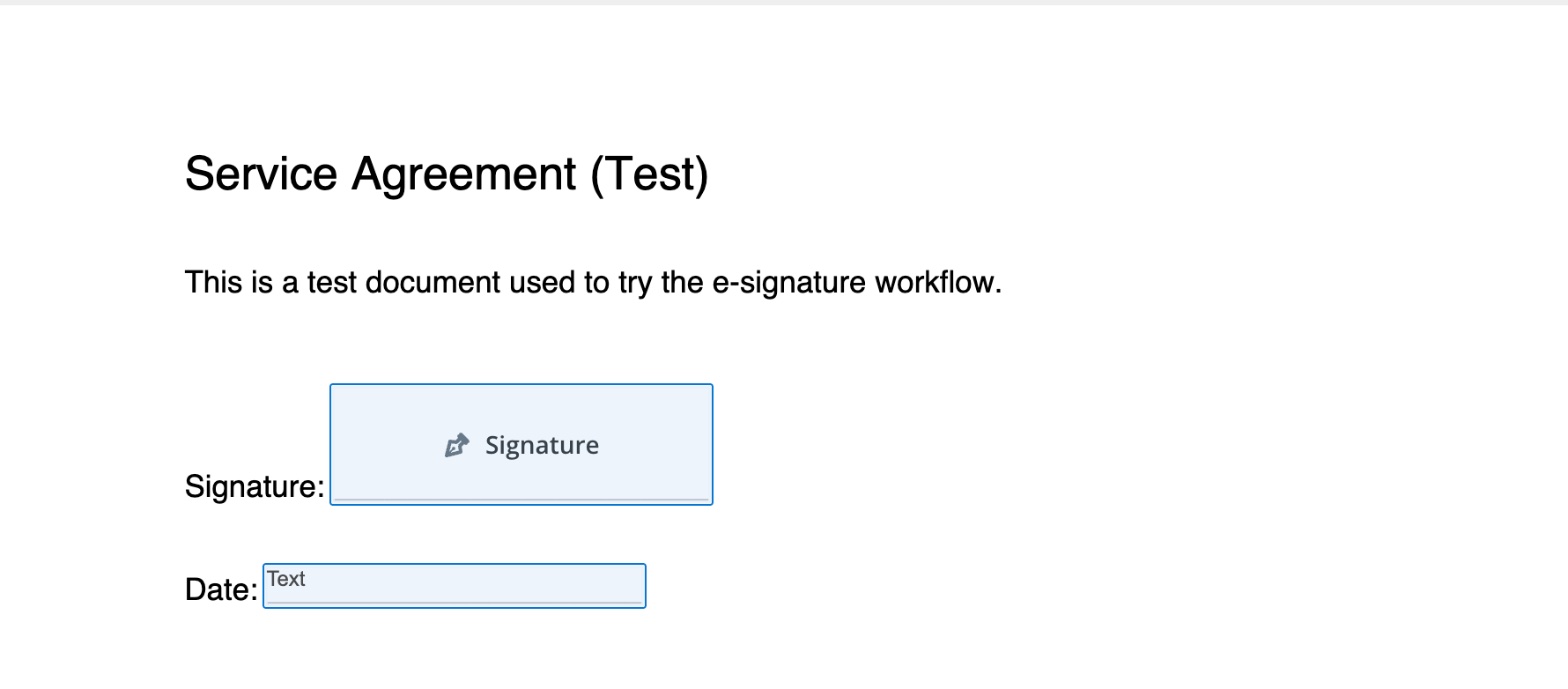
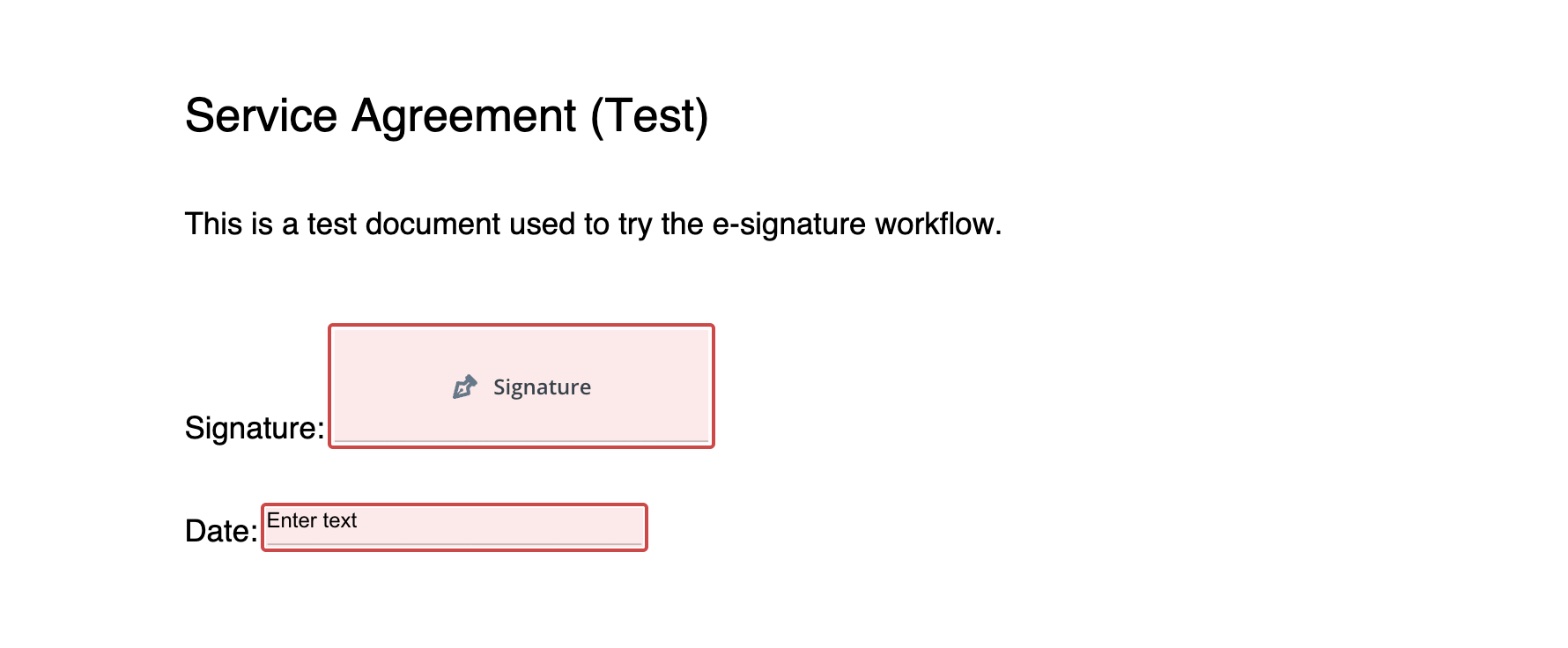
The date line became a text box. The "Date" line on our agreement turned into a free text field. The signer could type anything there, and the document had no automatic signing date.
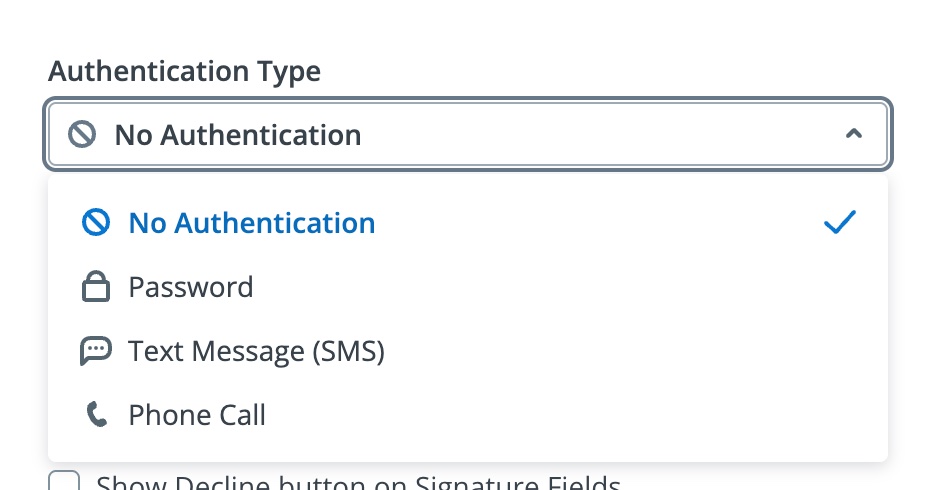
Three ways to verify a signer. Recipient settings offered a password, a text message code or a phone call, with no authentication selected by default. We did not see a government ID check.
Defaults to check before sending. Invites expired after 30 days, automatic reminders were off, and forwarding and the decline button were switched off for the recipient. Canceling a sent invite took two clicks, and under SignNow's rules a canceled invite still counts against the allowance.
How the SignNow Signing Experience Compares
Sign.Plus focuses on the signing work itself:
Preparing the document. Sign.Plus Auto-Place places fields automatically when you upload a document, ready for you to review and assign, on fillable PDFs and on flat documents such as scans and received faxes, where there is no form data to read.
Choosing how each signer proves who they are. Within one request, the sender can set a different check for each recipient: a passcode, an SMS code or an ID Check with a government ID. On Sign.Plus, passcode verification is included from Professional, while SignNow starts signer authentication on Business.
Reaching signers by phone. Signature requests can go out by SMS or WhatsApp, with a monthly allowance included in each seat instead of a per-message fee.
Proof after signing. Each signed document comes with a separate Certificate of Completion, alongside the audit trail, which makes it easy to file or share the evidence on its own.
8. SignNow API and Developer Plans
SignNow sells API access on separate plans. Dev Mode is free for testing, and a free trial includes 250 signature invites in production. The Professional API plan is billed annually by invite volume: $84 per month for 500 invites a year, $146 for 1,000, $250 for 2,000 and $500 for 5,000. When you reach the limit, SignNow upgrades you automatically to the next tier and charges the difference. QES and advanced compliance features are listed on the Enterprise API plan.
How SignNow's API Compares
| Plan level | SignNow API (annual) | Sign.Plus API (annual) |
|---|---|---|
| Free | Dev Mode for testing; 250 production invites on the trial | Sandbox for testing |
| Entry | Professional: $84/mo, 500 invites a year (about $2.00 per invite) | Essential: $75.99/mo, 50 requests a month (about $1.52 per request) |
| Higher volume | Professional: $250/mo for 2,000 invites a year (about $1.50 per invite); $500/mo for 5,000 (about $1.20); Enterprise custom | Grow: $279.99/mo, 200 requests a month (about $1.40 per request); Scale: $659.99/mo, 600 requests a month (about $1.10) |
| AES and QES through the API | QES listed on Enterprise (custom price) | Supported on every API plan; QES credits cost extra |
What this means for you. Both companies publish their API prices. When each plan's full allowance is used, Sign.Plus costs less per request: about $1.52 against $2.00 at the entry level, $1.40 against $1.50 in the middle and $1.10 against $1.20 at the top published tier. Your actual cost depends on how many requests you send, so compare the yearly price of the plan that fits your volume. Every Sign.Plus API plan supports SES, AES and QES, while SignNow lists QES on its custom-priced Enterprise API plan. QES requires separately purchased credits on Sign.Plus; support for the signature level does not mean qualified signatures are free. See Sign.Plus API plans and the API documentation.
Elsewhere, DocuSign developer plans start at $50 per month, with AES and QES listed on the custom-priced Enhanced plan; Youtrust sells yearly API plans without a price on its pricing page and charges €2 per signature over quota; and Xodo Sign API Light costs $50 per month billed yearly for 50 documents, with no QES offering published.
Single Sign-On (SSO)
SignNow lists SSO only on its Site License, priced per invite or by quote.
Elsewhere, Skribble sells OIDC single sign-on as a Pro add-on at €2,000 or CHF 2,000 for setup plus €2,490 or CHF 2,490 a year; Signeasy lists SSO as a Business Pro add-on with no published price; and DocuSign lists SSO on Enhanced among its US eSignature plans, priced by sales, and on some IAM plans. Sign.Plus includes SSO on Enterprise at $49.99 per user per month on annual billing.
9. Check Recent SignNow Reviews
Pricing pages and terms only tell you what a provider promises. Users tell you how it feels a year in. We don't summarize other people's reviews here, because they change quickly and every team's experience is different. Instead, here is what we'd search for before renewing or committing:
- "SignNow invite limit" and "SignNow pay as you go", to see how teams manage the shared allowance.
- "SignNow auto renewal" and "SignNow cancel subscription", to see how others handled the renewal date.
- "SignNow price increase", to see what happened at renewal for teams your size.
- The same searches for any alternative you shortlist.
Independent review sites and community forums are the best places to look. Sort by most recent, and look for patterns rather than single complaints.
Should You Switch?
If your team signs a few simple agreements a year and needs nothing beyond a standard signature, SignNow's per-account price is hard to argue with, and switching may not be worth it. The case for moving gets stronger when you find yourself counting invites, need signer verification without paying for Enterprise, or a client or regulator asks for a qualified signature, HIPAA support or a specific storage country. Sign.Plus Professional includes unlimited signature requests and passcode verification, QES is available on every plan, and Enterprise adds HIPAA support and a choice of storage location at a published price.
Contract Terms to Read Before You Sign
SignNow's Terms of Service have a few clauses worth knowing before you buy:
- Automatic renewal. Subscriptions renew for periods equal to your initial term, or month to month if no term is set.
- No refunds. Fees are non-refundable except under the refund policy for first-time online purchases; the pricing page offers a 30-day money-back guarantee.
- Unused services expire. Prepaid, unused services expire at the end of the subscription period unless your terms allow carryover.
- Governing law. For airSlate, Inc. the law and venue are Massachusetts, USA; other airSlate entities apply Irish, Polish or Australian law.
How SignNow Terms Compare
- DocuSign: annual plans can be canceled within 30 days without penalty, once per customer; after that, the remaining balance of the year is owed.
- PandaDoc: annual orders are non-cancelable and fees are non-refundable.
- Adobe Acrobat for teams: annual plans billed monthly carry a fee of half your remaining annual commitment if you cancel after 14 days.
If you are switching, check your renewal date and billing option first, so you can move without paying for a year you will not use.
Canceling SignNow: What to Know
You can cancel at any time in the Admin Console under Manage Subscription, or through support if your account was set up by SignNow's sales team and paid by invoice. Fees already paid are not refunded outside the first-purchase money-back period, so find your renewal date first and start testing an alternative a month or two before it. Download your signed documents and their audit trails, rebuild the templates you use most, and send one real agreement to a colleague on a phone and on a computer.
How to Switch From SignNow
- Check your renewal date in the Admin Console, and whether you are inside the 30-day money-back window.
- Export what you need. Download your signed documents and their audit trails.
- Rebuild your most used templates in the new tool first, then the rest as they come up.
- Run one real agreement end to end with a colleague, on a phone and on a computer, before you move your team.
- Cancel before renewal, so you do not pay for another period you will not use.
Best SignNow Alternatives
SignNow Alternatives at a Glance
| Platform | Team plan (annual) | Sending limit | Best for |
|---|---|---|---|
| Sign.Plus | $19.99 | Unlimited | QES on every plan; verification from Professional; storage choice on Enterprise |
| SignNow | Priced per account (unlimited users) | 100 invites per account per year | Lowest starting price |
| DocuSign | $25 | 100 envelopes per user per year | Low-volume standard signing |
| PandaDoc | Starter | Unlimited in the app | Proposals and quotes |
| Dropbox Sign | $25 (2+ users) | Unlimited | Teams on Dropbox |
| Adobe Acrobat Sign | $23.99 (Acrobat Pro for teams, billed monthly) | No caps in Acrobat; 150 per user per year on Sign Solutions | Teams that edit PDFs in Acrobat |
| Zoho Sign | Professional | Unlimited from Professional; 25 per user per month on Standard | Teams already on Zoho CRM or Zoho One |
| Skribble | €23 or CHF 23 (Team) | Unlimited SES; 72 pooled AES/QES per user per year on annual Team | DACH teams that need SES, AES and QES |
| Signeasy | $20 (Business) | Unlimited with fair usage; 5 per month on Personal | Individuals who mostly sign on mobile |
| Youtrust (Yousign) | $23 for Plus | Unlimited SES on Plus; 10 per month on One | French teams that want a domestic QTSP |
Sign.Plus: Best Overall SignNow Alternative
Sign.Plus is our pick for teams that send contracts every week and do not want to count requests. Professional includes unlimited signature requests, up to five users and 10 templates for $19.99 per user per month on annual billing, with passcode verification included, SMS code verification available and ID verification at $2 per check. Every plan, including Free, supports QES at $5 per recipient, and purchased credits do not expire. Enterprise adds storage-region choice, SSO and HIPAA support with the required controls and BAA. Sign.Plus is built by Alohi in Geneva, Switzerland, is certified to ISO/IEC 27001:2022 and has a SOC 2 Type 2 report. Compare Sign.Plus plans and start a free trial.
Best for: teams that need unlimited signing, signer verification, qualified electronic signatures and control over where their documents are stored, from a Swiss provider.
Dropbox Sign: Signing Right Next to Your Dropbox Files
Dropbox Sign, formerly HelloSign, offers Essentials for one user and Standard at $25 per user per month ($30 monthly, two or more users), with unlimited signature requests. Data residency is included on Premium, priced by quote, and qualified signatures need the API Premium plan plus a paid eID add-on. See our Dropbox Sign review for the full breakdown.
Best for: teams whose files already live in Dropbox.
Zoho Sign: Low Entry Price, With Credits on Top
Zoho Sign Standard includes 25 envelopes per user per month, and Professional has unlimited envelopes. In-person signing, bulk send, SignForms and the API are listed on Enterprise at $22, and SMS, bulk send, forms, API signature requests and most qualified signature providers consume prepaid credits. See our Zoho Sign review for the full breakdown.
Best for: teams already working in Zoho CRM or Zoho One.
Final Verdict
For teams whose main job is getting agreements signed, Sign.Plus is our winner: a Swiss provider with ISO 27001 certification and a SOC 2 Type 2 report. Professional includes unlimited signature requests and signer verification at a published price, and every plan, including Free, supports QES with purchased credits that do not expire. Teams that need control over storage location, SSO or HIPAA support can choose Enterprise with the required settings and agreements, without per-invite pricing. If you sign only a few simple agreements a year, SignNow's Business plan remains an inexpensive choice. Start a Sign.Plus free trial and test it with your own documents.
FAQs
How much does SignNow cost?

SignNow Business costs $8 per month on annual billing, Business Premium $20 and Enterprise $30, or $20, $30 and $50 on monthly billing. Each price covers the whole account with unlimited users. The Site License is priced at $1.50 per signature invite. Annual plans include 100 signature invites per account per year.
Is there a free version of SignNow?
No. SignNow offers a 7-day free trial and a 30-day money-back guarantee on first online purchases, but no free plan for sending. Its free developer account is for API testing only. Sign.Plus has a free plan with three signature requests in total.
Is SignNow legally binding?
Yes, SignNow signatures are simple electronic signatures (SES), valid for most everyday agreements under laws such as the US ESIGN Act and the EU eIDAS regulation. Advanced and qualified signatures (AES and QES) are listed only on the Site License, with QES as a paid add-on. Sign.Plus offers QES under eIDAS and Swiss ZertES on every plan, including Free, at $5 per recipient.
Is SignNow HIPAA compliant?
SignNow lists HIPAA compliance through a BAA only on its Site License, as a paid add-on without a published price. Sign.Plus supports HIPAA on its Enterprise plan at a published $49.99 per user per month on annual billing, with Advanced Security Controls and a signed BAA.
Is there a European alternative to SignNow?
Yes. Sign.Plus is built by Alohi, a Swiss company headquartered in Geneva. Documents are stored in a Swiss data center by default, and qualified electronic signatures under eIDAS and Swiss ZertES are available on every plan, including Free. Enterprise customers can choose where their files are stored, including EU and Swiss regions.
What is the best SignNow alternative?
Sign.Plus is our top pick for teams that send contracts regularly: Professional includes unlimited signature requests, passcode verification and 10 templates for $19.99 per user per month on annual billing, and every plan supports QES at $5 per recipient. Dropbox Sign and Zoho Sign fit narrower needs.

Featured Articles





Confédération Suisse
Confederazione Svizzera
Confederaziun Svizra
Swiss Confederation
Innosuisse - Swiss Innovation Agency



